
Domain Expiration Monitoring: Never Lose a Domain Again
Learn how domain expiration monitoring helps prevent lost domains, spot expiry risks, and alert your team before auto-renew failures cause problems.

Here's the short version: auto-renew and registrar emails are not a safety net on their own. Cards expire, contact emails go stale and domains get forgotten. Independent domain expiration monitoring reads the expiry date from public registration data and alerts your team in the channels they actually use, ahead of the deadline (say, at 60, 30, 14 and 7 days). It also gives you one place to watch every domain you own. It can't renew a domain for you. What it does is make sure a human hears about the problem while there's still time to fix it.
If you're the person who gets the "why is the site down?" message, this guide is for you. We'll look at how good domains get lost, what happens when one expires, why registrar reminders fall short, and how to set up a process that survives people changing jobs. Grab a coffee ☕ and let's get into it.
Why a lapsed domain is a bigger deal than it looks
Picture a Monday morning. Someone in support says the website is down. Then sales says email bounced all weekend. Then a developer notices the API is returning errors, and the SSO login that half your tools depend on has stopped working. Everyone assumes a major outage, and the team spends an hour checking servers, load balancers and the CDN. Eventually somebody runs a WHOIS lookup and finds the company domain expired on Saturday.
Nothing was technically broken. The servers were fine. A renewal just didn't happen.
That's the thing about domain expiry: so much hangs off one DNS name that the damage spreads fast. When a domain stops resolving, everything that relies on it can become unreachable:
- Your website and every landing page on it
- Email delivery, including the SPF, DKIM and DMARC records (the DNS entries that prove your mail is genuine)
- API endpoints your customers and partners call
- SSO and authentication flows tied to your domain
- Third-party integrations and webhooks pointing at your hostnames
A quick note on SSL certificates, because the two are easy to mix up. Domain expiry doesn't revoke or invalidate a certificate that hasn't itself expired. The trouble is that once the name stops resolving, nobody can reach the service to use that certificate, and renewing certificates that rely on domain or DNS validation can fail too. Certificate expiry and domain expiry are separate dates, so track both.
The other uncomfortable truth is that an expiry is rarely a technical failure. It's a process failure: a card, an inbox, a handover, a spreadsheet nobody updated. I find that oddly comforting, because process failures are preventable.
How good domains get lost
Sensible, well-run teams lose domains. It almost never comes down to carelessness. Usually there's a gap in ownership that nobody noticed until it mattered. These are the usual suspects:
- The expired or replaced payment card. Auto-renew is attached to a card that was reissued eighteen months ago. The renewal fails, and the retry emails land in an inbox nobody reads.
- Registrar notices going to a stale contact. The account email belongs to someone who left two years ago. Their mailbox was deleted, so the warnings bounce.
- Personal registrar accounts. A developer or agency registered the domain under their own login years ago, and it works fine until they move on.
- Forgotten domains. Old campaign sites, typo-protection domains, acquired brands and staging names sit in the portfolio with nobody watching them.
- Mergers, reorganisations and transfers. When a company is acquired or a registrar is swapped, the renewal chain can break without anyone noticing.
- Shadow domains. Marketing registered a domain for a product launch and IT never heard about it.

None of this is anyone's fault. Nobody was assigned to own the thing, so nobody did. The rest of this post is about closing those gaps.
What happens when a domain expires?
The lifecycle isn't as simple as "expired, therefore gone", and it isn't the same for every domain. The steps below describe how many gTLDs (such as .com, .net and .org) typically behave. Country-code domains like .uk follow their own rules, which I cover separately underneath. Timings vary by registrar and registry, so confirm the specifics for your own domains.
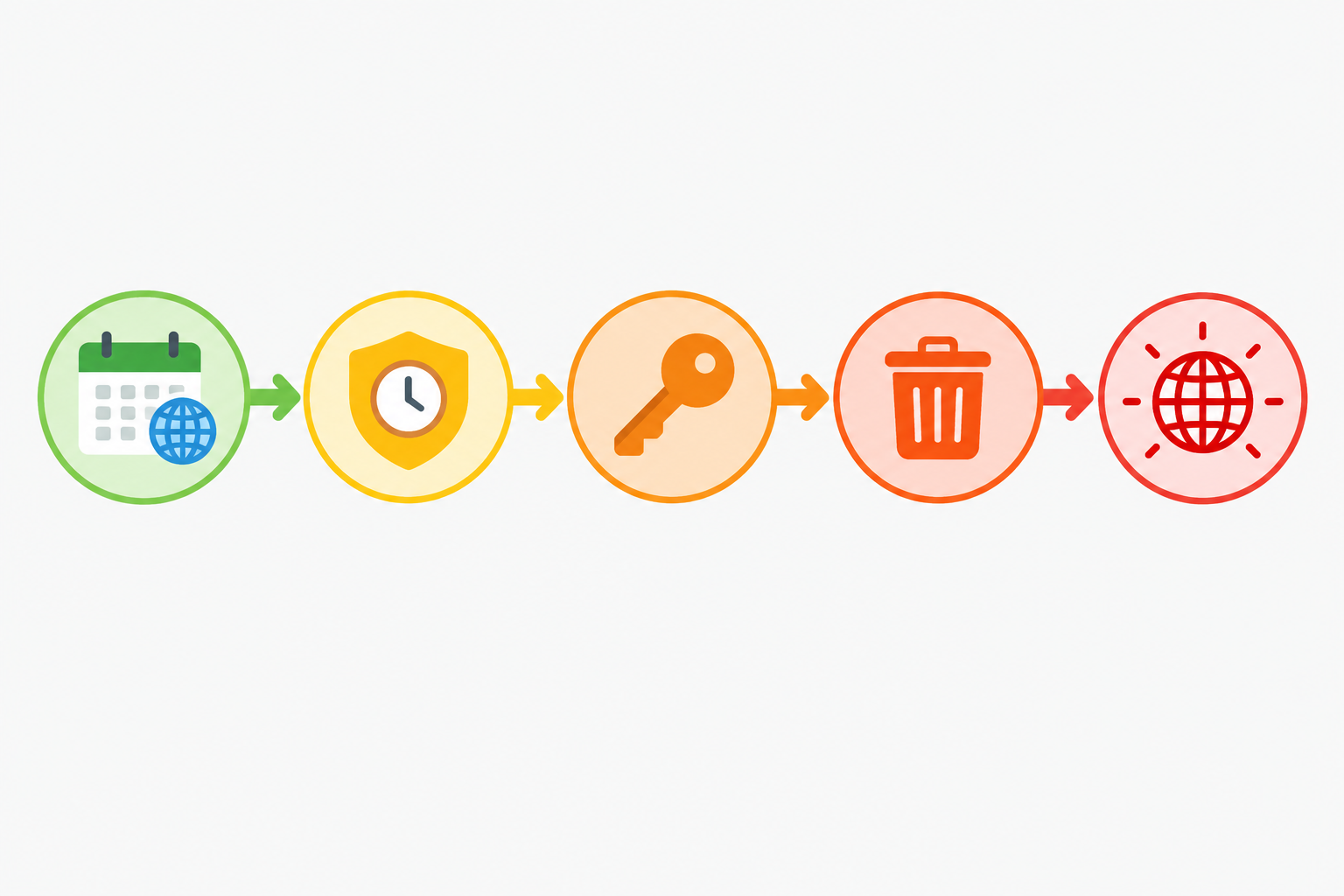
Typical gTLD domain expiry lifecycle
- Day of expiry. Many registrars give a short grace period, but that doesn't mean everything keeps working. Some point DNS at a parking page straight away, so your website, email and API can break immediately.
- Renewal grace period. Some registrars let you renew at the normal price for a while after expiry. Whether this exists, and how long it lasts, depends on the registrar and TLD.
- Redemption period. After the registration is deleted, many gTLDs offer a redemption window in which the former registrant can ask for the domain to be restored. It's often possible, but usually for a much higher fee.
- Pending delete and release. A short pending-delete phase follows. After that, the domain returns to the public pool and anyone can register it.
What happens when a .uk or .co.uk domain expires?
If you run .uk domains, the registry is Nominet, and your registrar handles renewals on your behalf. Broadly, a .uk domain that isn't renewed is suspended after expiry, which means the website and email stop working. If it still isn't renewed within the period Nominet sets, it's cancelled and anyone can register it. I'm deliberately not quoting day counts, because Nominet's rules and timings can change. Check Nominet's current guidance on expiring domains and your registrar's own policy before you rely on any figure, including one from a blog post.
What ICANN's expired-domain policy does and doesn't give you
ICANN's Expired Registration Recovery Policy (ERRP) applies to registrars of gTLDs. In summary, it requires them to send registrants expiry notices ahead of expiry (around one month and one week beforehand), plus a further notice shortly after if the domain hasn't been renewed. The current policy text on ICANN's website is the authoritative source, so read it for the exact wording. Even then, those notices go to the contact email on file. If that address is out of date, the notice goes nowhere, and the policy can't help you.
Domain expiry risks beyond downtime
Downtime is the visible damage. The quieter risks can be worse:
- Email interception. If someone else registers your old domain and sets up mail on it, they could receive any messages still being sent to addresses at that domain, including password-reset emails. That only happens if a third party registers the domain and configures mail, but it's a real risk for accounts that still use old addresses.
- Phishing. A convincing site on your former domain, with your old brand's history behind it, is a gift to scammers.
- Lost SEO equity. Years of backlinks and authority can evaporate, or end up benefiting somebody else.
Even huge organisations get caught. In April 2021, google.com.ar was widely reported to have become available after its registration lapsed, and an individual in Argentina registered it. The domain was returned to Google, but the episode shows how a missed renewal can reach the public pool. Recovering a domain that someone else now holds can mean negotiation or legal action, not just a renewal fee.
Why auto-renew and registrar reminders aren't enough
Auto-renew is a good first layer, and I'd never tell you to turn it off. But it depends on a valid card, a working account and no registrar-side flags, such as a failed verification or a billing hold. If any one of those goes wrong, the safety net has a hole in it.
Here's how the common approaches compare:
| Approach | Reliability | Team visibility | Alert channels | Independent of registrar? |
|---|---|---|---|---|
| Registrar emails | Depends on a current contact address and the registrar's own systems | One inbox, easily filtered as marketing | Email only | No |
| Calendar reminders | Only as good as the last person who set them | Usually one person's calendar | Calendar notification | Yes, but manual |
| Spreadsheets | Go stale as soon as someone forgets to update them | Shared, but passive: nobody is told anything | None | Yes, but manual |
| Dedicated domain expiration monitoring | Checks public registration data on a schedule | Whole team via shared channels | Depends on the tool; Moonitor supports email, Slack, Discord, Telegram and webhooks | Yes |

The last column is the one that matters. Independent monitoring reads public registration data (WHOIS or RDAP), so it doesn't depend on the registrar behaving, your card working or one person reading their inbox. It has limits, though. Some registries publish limited or no expiry data, and a monitor can only report what the public record shows. Think of it as a second pair of eyes that doesn't share the first pair's blind spots.
How to set up domain expiration monitoring alerts
An alert only helps if the right person sees it with enough time to act. Here's how I'd set it up in Moonitor. It's a quick job per domain, but check the current product documentation for the latest options.
- Add each domain to a domain and SSL expiration monitor. Enter the domain name and save. Moonitor reads the expiry date from public registration data, so there's no registrar login to share.
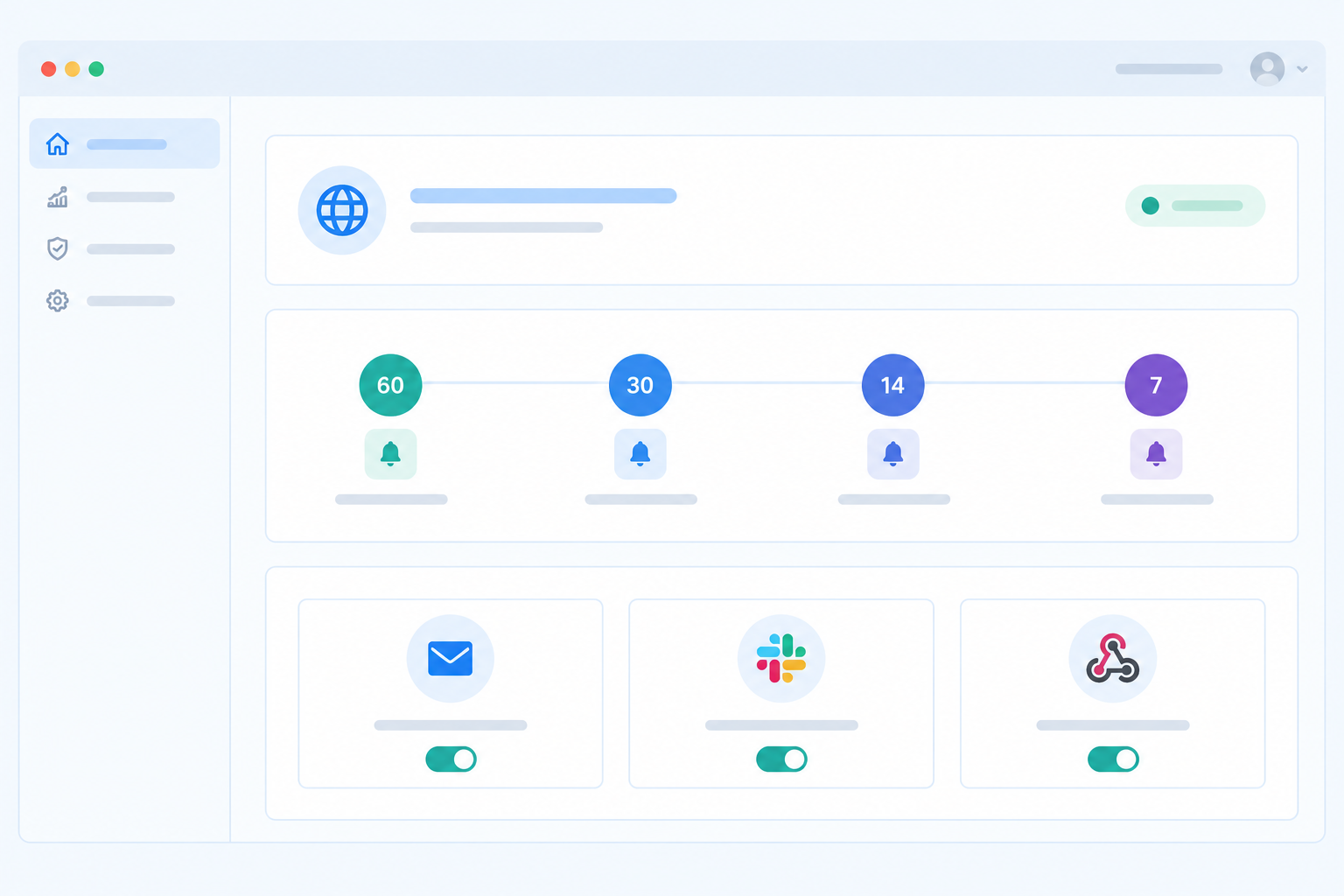
- Choose sensible thresholds. I like 60, 30, 14, 7 and 1 days. The 60-day alert is a planning task ("check the card, confirm the owner"), while the 1-day alert is an emergency. Spacing them out gives you several chances to catch a problem before it's urgent.
- Route alerts to a shared place. Send them to email, Slack, Discord, Telegram or a webhook. A shared channel beats one person's inbox, because that person might be on holiday or gone.
- Escalate to different audiences. Perhaps the named owner hears at 60 days, and the wider team, plus whoever handles billing, hears at 14. Early alerts nudge, and later ones raise the volume.
- Pair it with SSL certificate monitoring. Certificate expiry and domain expiry are separate dates, but they belong in the same view so you don't fix one and miss the other.
- Add DNS monitoring. DNS record change detection flags unexpected changes to your records, which can be an early sign of a hijack or a mistaken transfer. It often shows up before anything visibly breaks.
- Test the alert path once. Send a test notification to every channel and confirm a person actually sees it. It's far better to discover a muted Slack channel today than on the day it matters.
Don't worry too much about noise. Expiry alerts are infrequent by design, usually a handful per domain per year, which is exactly why they need a reliable route to a person who will read them.
How to manage a portfolio of domains without losing track
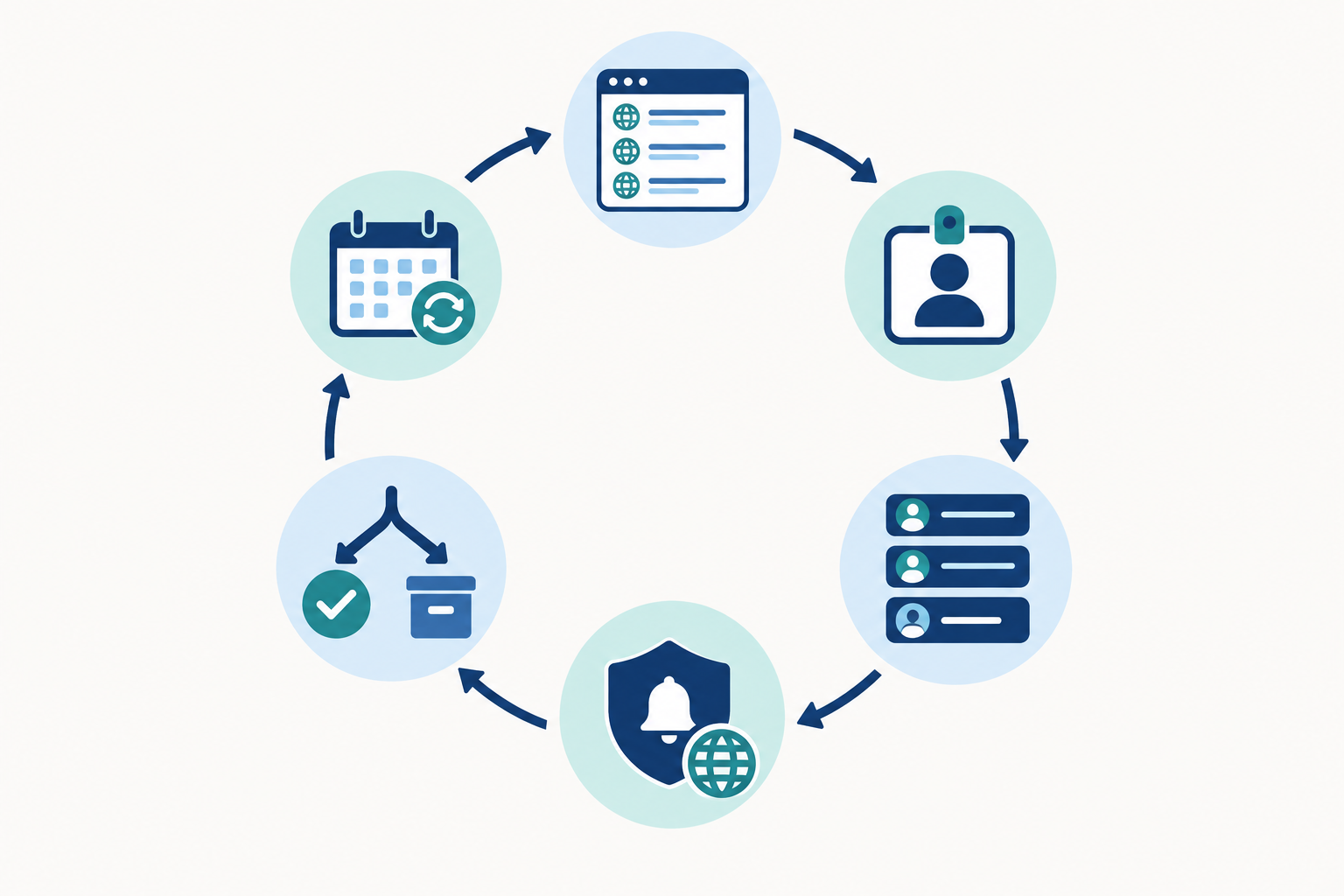
One domain is easy. Fifty, scattered across three registrars and two departments, is where things slip. This is the repeatable process I'd follow.
- Build a complete inventory. Pull from registrar accounts, DNS zones and certificate records, then have a quick chat with marketing and finance. Finance is the secret weapon here, because card statements reveal registrations nobody told you about.
- Assign a named owner and a backup. Every domain gets two names. "The team" is not an owner.
- Standardise registrar accounts. Use a shared, role-based email address (something like [email protected]) rather than personal ones, and turn on two-factor authentication and registrar lock. Keep the payment card details current and make sure billing knows what they're for.
- Add every domain to monitoring. Tag by environment, brand or team so the dashboard stays readable as it grows.
- Decide what to keep, consolidate or retire. Some domains should lapse deliberately. Just document why, so a future colleague doesn't wonder whether it was an accident.
- Review quarterly. Review again whenever someone joins, leaves, or a company is acquired, since those are the moments the chain breaks.
In Moonitor, each domain is its own monitor, and domain monitors share your allowance with any uptime, SSL, DNS or cron monitors you run. At the time of writing, the Solo plan ($14/mo) includes 20 monitors and the Max plan ($49/mo) offers unlimited monitors. Prices are listed in US dollars, and UK teams should check the pricing page for current rates and how VAT is applied, as plans can change.
If you already keep an internal inventory, the API and data export let you sync monitors with it rather than maintaining two lists. That's the best way to stop a spreadsheet going stale, because the spreadsheet stops being the source of truth.
Where domain monitoring fits in your wider monitoring setup
Most monitoring is about fast failures: a server falls over, an endpoint returns a 500, a job stops running. Uptime, API, server, cron job and heartbeat monitoring all catch those. Domain expiry is the opposite. It's a slow-burn risk that's invisible for months and then does its damage within an afternoon. Keeping both kinds in one dashboard means nothing falls between tools.
If you're not sure how many domains you actually have, Moonitor's free trial (check the current terms on the pricing page) is a low-risk way to audit them. Add what you know and see what the expiry dates look like. You may find one that surprises you.
What to do if your domain has already expired
If you're reading this because it has already happened, take a breath. Here's the order I'd work in:
- Contact the registrar immediately and confirm which stage of the lifecycle you're in. That determines your options and your costs.
- Renew or redeem as quickly as possible, and ask about fees up front.
- Check that nameservers and DNS records came back intact. Don't assume they did.
- Verify email delivery, SSL certificates and API endpoints once the domain resolves again.
- Review any security exposure from the outage window, especially around email and password resets.
- Run a short post-incident review and fix the ownership gap that caused it.
Domain expiration monitoring FAQs
How do I get alerted before my domain expires?
Add the domain to an independent expiration monitor and set several alert thresholds, such as 60, 30, 14 and 7 days. Send them to a shared channel like Slack or a team email so the alert doesn't depend on one person.
What happens after a domain expires?
It depends on the registrar and the TLD. For many gTLDs there's a grace period, then a redemption period where recovery costs more, and finally release to the public. For .uk domains, Nominet's own process applies, so check its current guidance.
Is auto-renew enough to protect a domain?
No. Auto-renew fails when a card expires, a payment is declined, or the account email is out of date. Treat it as one layer and add independent monitoring as a second.
Can I monitor many domains at once?
Yes. Each domain is its own monitor, and you can manage them all from a single dashboard. The number you can add depends on your plan, and the API helps if you want to automate adding domains.
Does domain expiration monitoring cover SSL certificates too?
They're separate expiry dates, but you can track them side by side. Moonitor's SSL and domain expiration monitor lets you watch both so you don't miss either.
Who should receive domain expiry alerts?
At least two people plus a shared team channel: the named owner, a backup, and whoever handles billing, since payment problems are a common cause.
Wrapping up
Losing a domain is almost never a dramatic technical event. It's a quiet process gap that waits for the worst possible moment. Keep auto-renew on, keep your registrar contact details current, and add independent domain expiration monitoring so that someone always hears about an expiry with weeks to spare, not hours. Do that, add a quarterly review, and the Monday-morning scramble becomes a story you only tell about other people's companies.