
Domain Expiration Monitoring: How to Avoid Losing Your Domain
Real stories of domains lost to missed renewals, why it keeps happening, and how domain expiration monitoring with sensible alert timings can stop it.
Meta description: Can a company lose its domain by accident? Yes. Learn how domains lapse, what happens when they expire, and how to set up domain expiration monitoring and renewal alerts that work for UK teams.
Yes, a company can lose its domain by accident, and it's more common than you'd think. It nearly always comes down to boring admin failures rather than anything dramatic: an expired card, an old contact email, or a renewal nobody owns. The fix is domain expiration monitoring that checks expiry dates independently of your registrar and alerts more than one person well ahead of time. Pair it with SSL certificate monitoring and DNS change detection, and you cover the three expiry-related failures that quietly take sites offline.
I'll be honest with you: most of us have at least one domain somewhere that we're only 'pretty sure' is on auto-renew. Maybe it's an old campaign site, or something an agency registered years ago. Let's talk about how that goes wrong, and how to make sure it doesn't happen on your watch.
Can a Company Really Lose Its Domain by Accident?
It's easy to assume only sloppy small businesses lose domains. Publicly reported cases suggest otherwise, though it's worth being careful about what each one actually shows. I've split them into a reported lapse and a registration-system incident, because they teach different lessons.
First, a reported lapse.
- Microsoft's hotmail.co.uk (2003). BBC News reported at the time that the UK Hotmail domain expired and was picked up by another party before Microsoft recovered it. The lesson: stale ownership details and no independent alert are a risky combination, even at huge scale.
Second, a registration-system incident that wasn't a missed renewal.
- Google.com (2015). Former Google employee Sanmay Ved bought google.com through Google Domains for a nominal fee, and Google reversed the sale shortly afterwards. Nothing expired here. It's a reminder that registration workflows can have gaps, but it isn't the same failure as a lapsed renewal. The lesson: control of a domain depends on the systems around it, not just the renewal date.
These stories have been retold many times, and details drift. I'd read the original coverage (searching the names and years will find it) before quoting them in a presentation. I've also left out cases where accounts differ on whether a renewal was actually missed.
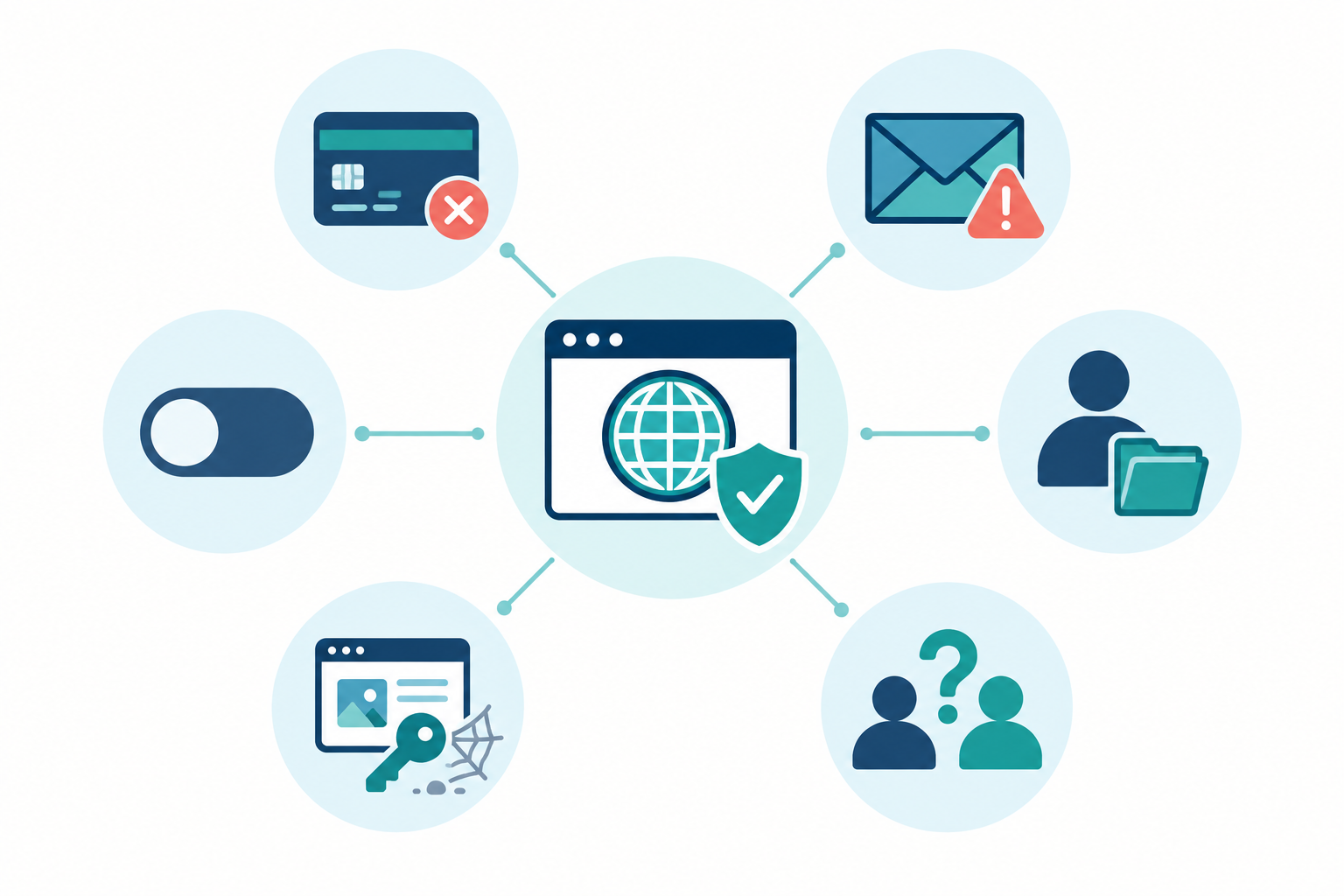
Here's the uncomfortable bit. Big names tend to get rescued through a quick call to the right contact or a motivated legal team. A small business with a missed renewal often gets none of that. And the fallout goes well beyond a dead homepage:
- Email bounces or silently goes missing
- APIs and webhooks stop resolving
- Customer and staff logins break
- Search rankings take a hit
- Someone else can register your name and receive mail meant for you
The common thread is a single owner, stale contact details and no external check. The rest of this post tackles each one.
Why Domains Lapse Unexpectedly
Domains rarely vanish because of one dramatic mistake. They lapse because small, reasonable things pile up. These are the usual suspects.
- Expired or replaced payment cards. The card on the registrar account belonged to someone who has since left, or it was reissued with a new expiry date.
- Reminders going nowhere. Renewal emails land in a former employee's inbox, a shared mailbox nobody reads, or a spam folder. ICANN's Expired Registration Recovery Policy requires gTLD registrars to send reminders, but it sets a minimum standard and can't guarantee anyone reads them.
- Auto-renew off, or never on. This is very common when an agency, a freelancer or a previous IT lead registered the domain.
- Personal account ownership. The domain sits under someone's personal login, with no company-level control.
- Forgotten acquisitions. Mergers bring in old brands, and old campaigns leave behind domains nobody remembers.
- Registrar and registry quirks. Grace periods, redemption fees and release timings differ between registries and registrars.
The renewal that fell between two teams
Picture a mid-sized company with a marketing team and an IT team. Marketing bought a campaign domain through an agency three years ago, and IT assumed marketing handled renewals. Marketing assumed the agency did. The agency's contact left, the card on file expired, and the reminders went to an address that no longer exists. Nobody did anything wrong, exactly. It was simply nobody's job.
That's the pattern I'd bet on in most real-world lapses. It's rarely negligence, just an ownership gap.
What Happens When a Domain Expires?
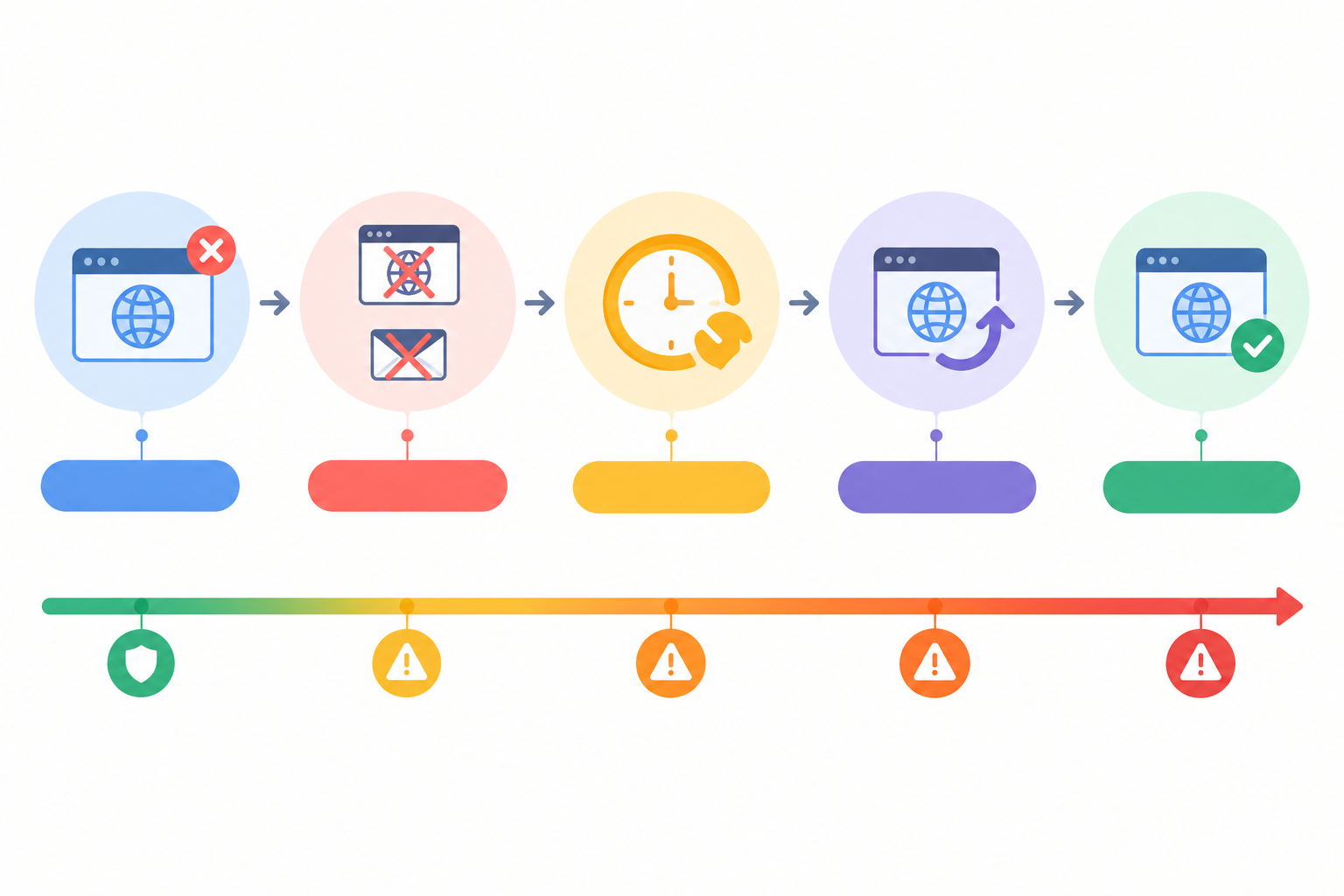
Expiry isn't a single cliff edge. It's a slope, and its shape depends on the registry and your registrar. The sequence below is a common example for .com and similar gTLDs, not a universal lifecycle. Some registrars skip steps, shorten them or charge differently, so check your own registrar's expiry policy rather than relying on one expected timeline.
- Expiry date. The registration expires, but the site often keeps working for a short time. A website that still loads doesn't prove the registration was renewed.
- Parking or suspension. Many registrars park or suspend the domain at this point. DNS may stop resolving and email delivery may start to fail.
- Grace period. The registry's auto-renew grace period can last up to 45 days, but treat that as a possibility, not a promise. A registrar may delete the name within that window.
- Redemption. After deletion, many gTLDs offer a Redemption Grace Period of around 30 days. You can often still restore the domain, but usually at a higher fee and with less control.
- Pending delete and release. A short pending-delete phase (typically around five days) follows, and then anyone can register the name, including drop-catchers and squatters.
.uk versus .com: domain expiry timelines can differ
The timings above come from the gTLD framework, which doesn't govern country-code domains. Nominet runs .uk and .co.uk domains under its own rules, so the stages, lengths and recovery options can differ. Check Nominet's current guidance on renewals and expiry before you build a process around any timetable, and confirm what your own registrar does in the gaps.
A few practical checks for UK teams:
- Make sure the registrant email on your .uk domains is a monitored team alias, because registry and registrar reminders go there.
- Confirm which registrar currently manages each domain, and who holds the login.
- Compare the expiry date in your registrar's control panel with the date a public lookup reports. If they disagree, find out why now.
Why a domain expiry can be hard to diagnose
The nastiest part is the partial failure. Email might break first, or the website might hold on for a bit. Different symptoms show up in different teams, and nobody connects them to a single cause until a developer finally runs a lookup. Compare that to a normal outage, where everything goes red at once.
How Domain Expiration Monitoring Works
The idea is simple. A monitor looks up the registration data for each domain on a schedule, using WHOIS or its modern replacement, RDAP, and reads the expiry date. It works out the days remaining, then alerts you when the count crosses a threshold.
Why bother when your registrar already emails you? Because those emails are a single point of failure. They go to one address, depend on one account, and rely on someone reading them. An external monitor is a second opinion that doesn't care about any of that.
Whatever tool you choose, look for these basics:
- Regular checks that don't depend on anyone remembering
- Days-remaining calculation and configurable thresholds
- A history of changes, so you can see when an expiry date moved
- Alerts that go to more than one person or channel
There are limits worth knowing. Registries format or redact data differently, and RDAP availability varies by registry and domain type, so don't assume support is universal. Test the actual TLDs in your portfolio, including .uk and .co.uk, and compare what the monitor reports with your registrar's records before you rely on it.
One tool that covers this is Moonitor. Its SSL and domain expiration monitor sits alongside HTTP/S, keyword, port, ping, heartbeat and DNS monitors, so uptime and expiry tracking don't end up scattered across tools. Features and plans change, so check its current documentation and pricing page rather than taking my word for it.
One honest caveat: monitoring can warn you, but a human or a process still has to renew. The alert has to reach the right people.
What should a domain expiration alert include?
A useful alert is short and actionable. Something like this:
Domain expiry warning: example.co.uk expires in 30 days (registrar: ExampleRegistrar). Owner: IT Operations. Action: confirm renewal is in progress and the payment method is valid.
If the message doesn't say who owns the domain and what to do, it will be ignored by the third reminder.
How Far Ahead Should You Get a Domain Renewal Alert?
Thirty days sounds generous until you remember how renewals really work. Invoices need approval, purchase orders take a week, a transfer needs an authorisation code, and the person with the card is on holiday. That's why I recommend a staged cadence rather than a single reminder. These intervals are my own operational recommendation, not anything ICANN or Nominet mandates.
| Alert | Intended action | Suggested channel |
|---|---|---|
| 60 days | Plan the renewal and check payment details and ownership | Email to team alias and named owner |
| 30 days | Confirm renewal is in progress | Email plus Slack, Discord or Telegram |
| 14 days | Escalate if not confirmed | Chat, with the owner's manager tagged |
| 7 days | Treat as urgent | Chat plus webhook into your ticketing tool |
| 1 day | Emergency, all hands | Webhook, chat and direct contact |
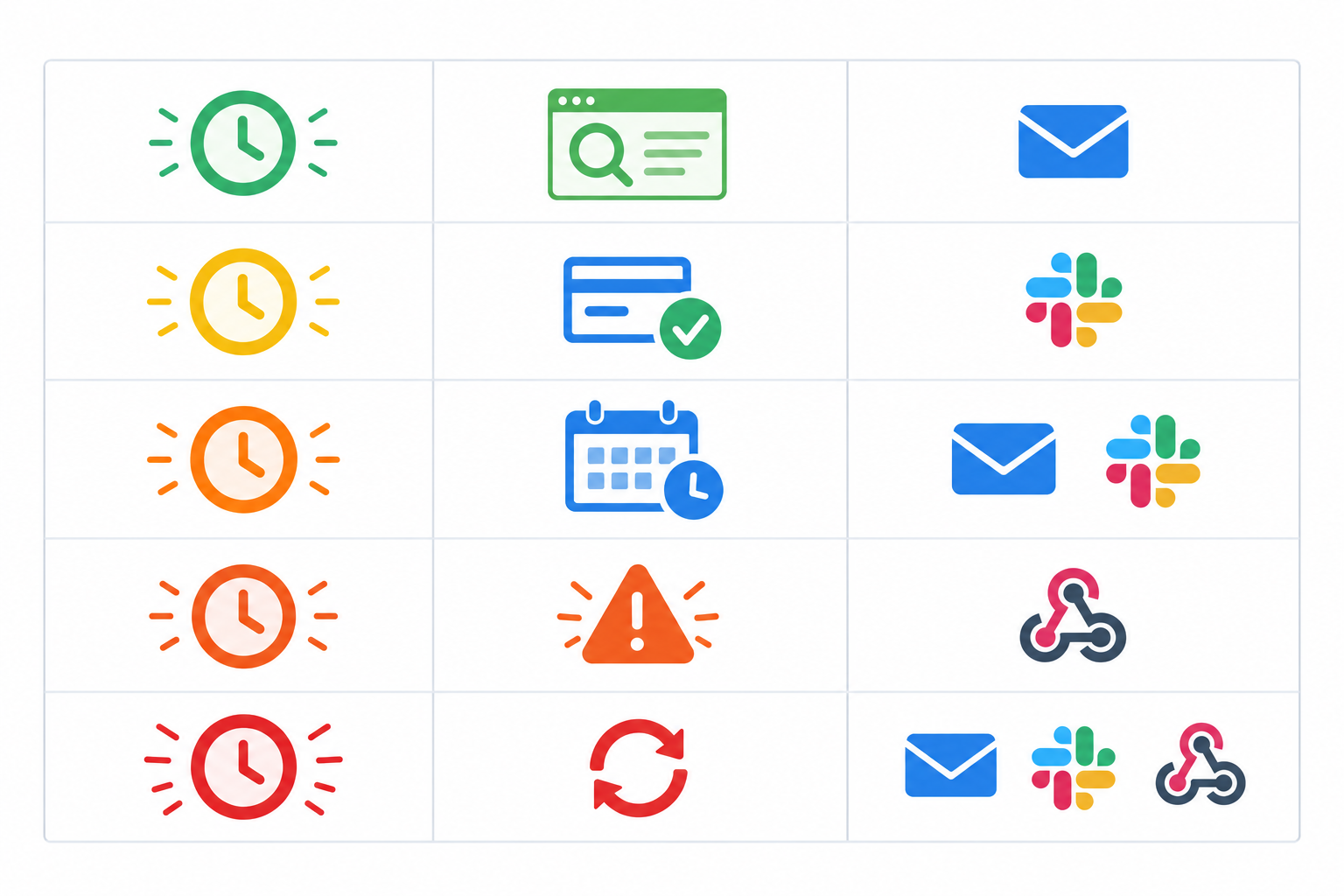
Two tweaks are worth making. Give yourself longer lead time for domains that need sign-off, purchase orders or multi-year renewals. And match the channel to the urgency: email is fine for early warnings, but the final week should create a ticket that someone has to close.
As for who receives them, use a team alias plus a named owner. Never rely on one person's inbox.
How to Set Up Domain Renewal Alerts: A Step-by-Step Guide
For a typical portfolio this takes an afternoon, and most of that is detective work rather than configuration. Steps 1, 2, 7 and 8 apply whatever tool you use. Steps 3 to 6 describe a monitoring setup in general, using Moonitor as the example.
- Build a domain inventory. Pull from registrars, DNS providers, cloud consoles and old invoices. Then ask marketing what they've bought. You'll be surprised.
- Record the essentials. For each domain, note the owner, registrar, renewal method and payment source.
- Add each domain as an expiration monitor. Start with a handful, including at least one .uk domain, and check the reported expiry date against your registrar. Moonitor has offered a free trial, but check its pricing page for current terms.
- Configure the thresholds from the alert table above.
- Route the alerts. Use email, chat or a webhook, with a shared channel so nothing depends on one person.
- Send a test alert. Confirm it reaches the right people before you need it.
- Turn on registrar auto-renew and registry lock where available. Treat monitoring as the backup, not the replacement, and check the payment method is valid.
- Review quarterly and after any staff change. Leavers are one of the biggest causes of orphaned domains.

What to do if your domain has already expired
If you're reading this with a lapsed domain, take a breath. Here's the order I'd work in:
- Log in to the registrar and check the domain's current status and renewal price. Don't assume it's gone.
- Renew immediately if the registrar allows it, even if that means a redemption fee.
- Contact the registrar's support if renewal is blocked, and keep a record of every conversation.
- Check DNS records and email routing after restoration, because they may need re-publishing.
- Run SSL and website checks to confirm everything came back.
- Move the domain into company-owned control so it can't happen again.
Combining Domain and SSL Expiration Monitoring
These two get mixed up constantly, so let's separate them. Domain expiry is about your ownership of the name. SSL certificate expiry is about whether the certificate that proves identity and encrypts traffic is still valid. Renewing one does nothing for the other.
| Domain expiration | SSL certificate expiration | |
|---|---|---|
| What it protects | Your ownership of the name | Trust and encryption for a hostname |
| Typical cycle | Usually annual or multi-year | 90 days (Let's Encrypt), with public certificates currently capped at 398 days under CA/Browser Forum rules |
| Failure symptom | Site and email stop resolving | Browser warnings, broken API clients |
| Usual owner | Whoever holds the registrar account | Platform, DevOps or hosting team |
| Suggested lead time | 60 days or more | 30 days or fewer, with alerts well before |
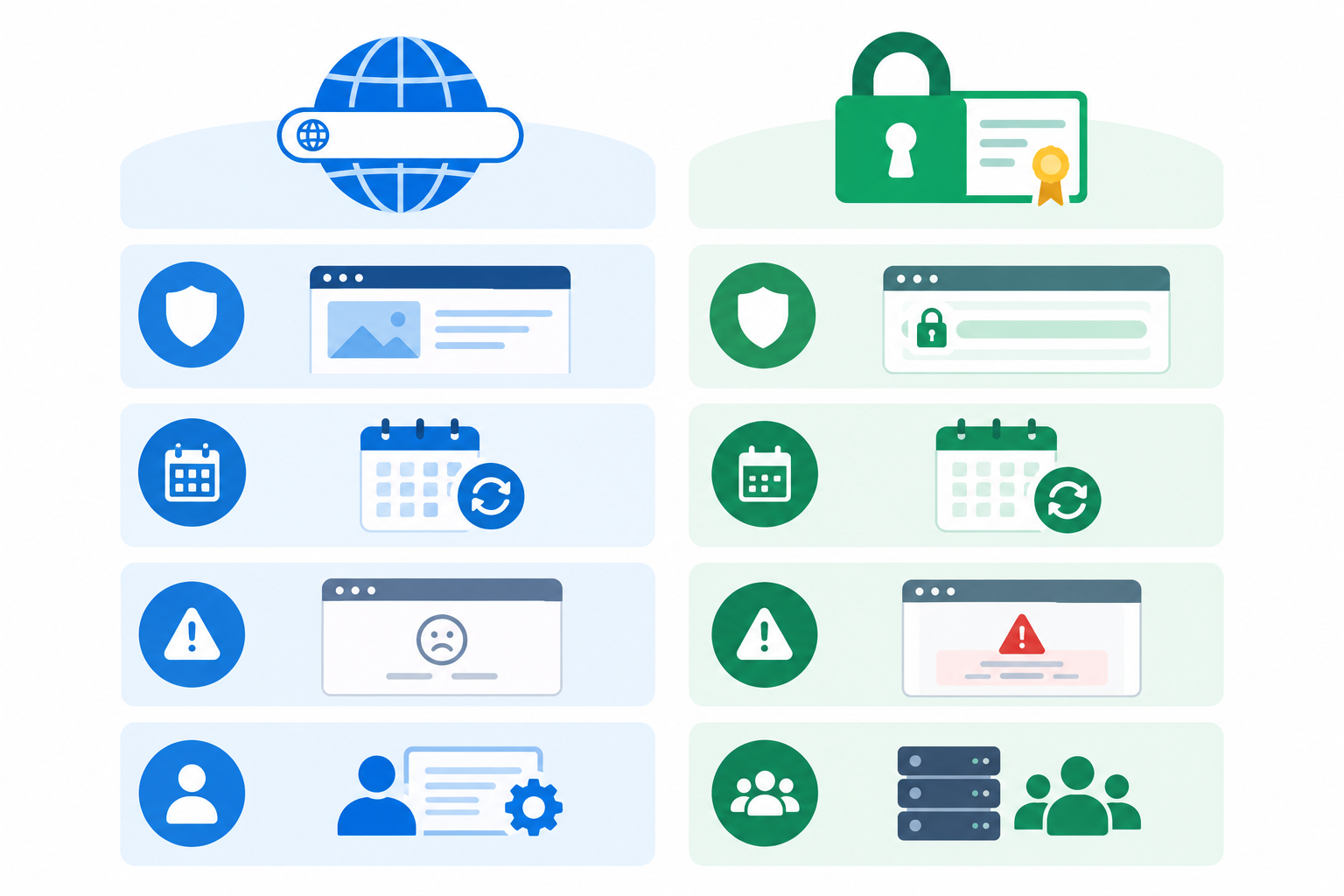
Certificate lifetimes have been getting shorter, so check the CA/Browser Forum for current limits rather than relying on last year's numbers. Don't assume auto-renewing certificates are safe, either. A changed DNS record, a broken ACME challenge or a renewal hook that quietly stopped running can all leave you with an expired certificate and a very confused on-call engineer. SSL monitoring probes the live HTTPS endpoint, so it catches this regardless of what your automation thinks happened.
I like to think of it as three layers:
- Domain expiration monitoring covers ownership of the name.
- SSL certificate monitoring covers the certificate on every public hostname.
- DNS monitoring detects unexpected record changes, which can signal a hijack or a misconfiguration.
Add website monitoring with keyword checks on top, and you can confirm the site actually works after each renewal, not just that a date moved.
How to Track Domain Expiration Across Many Domains
Once you're past a dozen domains, spreadsheets tend to go stale quickly. Here's what works better.
- Consolidate ownership. Move domains into a company-owned registrar account with role-based access and two-factor authentication.
- Standardise naming and tagging by brand, client, environment and criticality, so alerts can be prioritised.
- Use one monitoring dashboard rather than a spreadsheet.
- Prioritise. Primary brand domains and email-sending domains come first, then campaign and defensive registrations.
- Decide what to do with domains you no longer need. Document them and let them lapse deliberately, not by accident.
- Use an API or data export to feed expiry data into your CMDB or inventory, so you're never locked in.
When comparing tools, check monitor limits and pricing against your real domain count, including the ones you haven't found yet. If you manage client domains, a branded status page can help keep stakeholders informed when something does go wrong.
Domain Expiration Monitoring Checklist
Pin this somewhere your team will actually see it.
- Auto-renew on, with a payment method whose own expiry date you're tracking
- Registrar and registrant contacts pointing to a team alias
- Independent expiration monitoring with staged alerts
- SSL monitoring on every public hostname
- DNS change detection on critical records
- Registry or transfer lock on critical domains
- A named owner and a documented renewal process
- Quarterly review, plus offboarding checks for leavers
None of this is glamorous. But it's exactly the kind of boring that saves a very bad Monday.
Frequently Asked Questions About Domain Expiration Monitoring
Can a company really lose its domain by accident?
Yes. Most losses come from ordinary admin slips such as an expired payment card, renewal emails going to someone who has left, or auto-renew being off. Once a domain passes its grace and redemption periods, it can be released and registered by someone else.
How far ahead should I get a domain renewal alert?
Start at 60 days and escalate as the date approaches, using the cadence in the table above. Early alerts leave time for payment and approvals, and later ones act as escalations if nothing has happened.
What's the difference between domain and SSL expiration?
Domain expiration is the end of your registration for the name itself. If it lapses, your website and email can stop resolving. SSL expiration is the end of a certificate's validity. If it lapses, your site still exists, but browsers and API clients will show errors. They're renewed in different places, so each needs its own monitoring.
Is registrar auto-renewal enough?
Not on its own. Auto-renew fails when payment details are out of date, when it was never enabled, or when the account is controlled by someone who has moved on. Independent monitoring gives you a second, external check.
How do I track expiration across many domains?
Build a single inventory, move registrations to a company-owned account, and add each domain to a central monitoring dashboard with consistent alert routing.
Does domain expiration monitoring work for .uk and .co.uk domains?
Often, but not guaranteed, because registry data formats and RDAP availability differ. Test the specific TLDs you hold, and compare the expiry date your tool reports against your registrar's records before relying on it.