
Port and Ping Monitoring: When HTTP Checks Aren't Enough
Learn how port monitoring checks databases, mail servers and custom TCP services beyond HTTP, and when to pair it with ping checks.
Port Monitoring and Ping Monitoring: Server Monitoring Beyond HTTP Checks
HTTP checks confirm that a web page or API responds. They can't tell you whether your database, mail server or custom TCP service is reachable. Port monitoring checks whether a specific host and port accepts TCP connections. Ping monitoring checks whether an ICMP responder on the route to that host answers. Used alongside HTTP checks, the two give you layered server monitoring and a better idea of where to start investigating.
If you've only ever monitored websites, that might sound like overkill. It isn't. Most of us start with a simple HTTP check, and it serves us well until the day it doesn't. I'll walk through when that day arrives, how port and ping checks work, and how to combine them without drowning in alerts. ☕
The Limits of HTTP-Only Server Monitoring
Picture it: 2am, your phone buzzes, and it's not your monitoring tool. It's a customer. Their order went through, but it's not in their account. You check your dashboard and everything is green. The homepage returns 200 OK and the health endpoint is happy, yet orders aren't saving because the database connection is dead.
This isn't a failure of HTTP monitoring. It comes down to what an HTTP check actually proves: a web server (or a cache or proxy in front of it) answered a request. That's all. It doesn't prove that the services behind it are working.
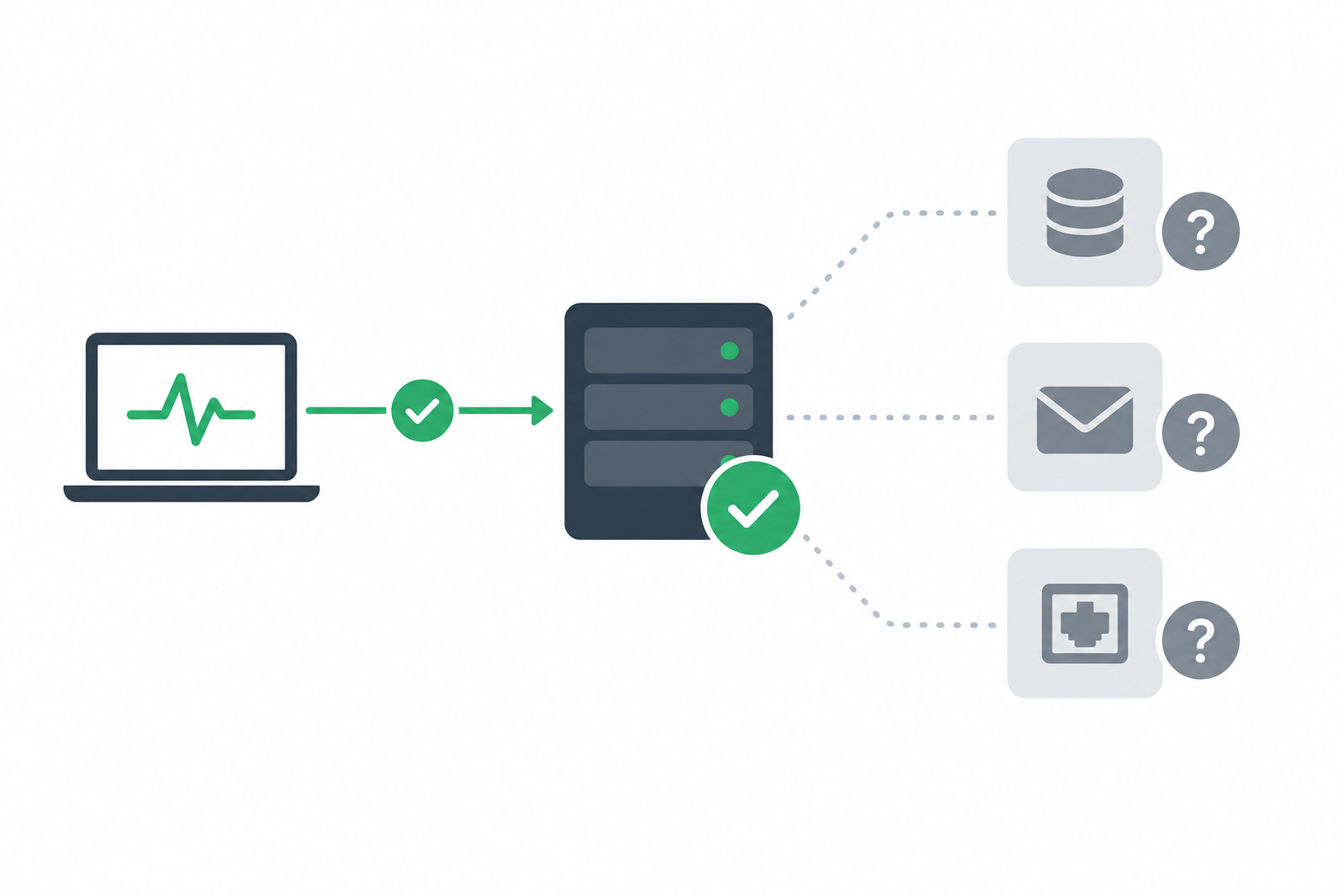
Which services can't HTTP checks monitor?
These services don't speak HTTP, so a web check can't verify them:
- Databases such as PostgreSQL, MySQL, MariaDB, MongoDB and Redis
- Mail servers running SMTP, IMAP and POP3
- Remote access and file transfer, including SSH, SFTP, FTP and RDP
- Message queues and brokers like RabbitMQ
- Game servers, IoT gateways and custom TCP services, which is to say anything with its own protocol
There's one more wrinkle. Caches and CDNs can keep returning 200 OK for pages they've stored while your origin server is struggling or unavailable. So a green HTTP check can sometimes mean 'the cache is fine' rather than 'the application is fine'.
None of this makes HTTP monitoring wrong. It's one important layer, and most of us outgrow it as our stack grows. That's a perfectly normal milestone.
How Port Monitoring Works
A server exposes numbered ports, and each service listens on its own: web traffic on 443, SSH on 22, PostgreSQL on 5432, and so on. There are 65,535 possible TCP and UDP port numbers. Port monitoring tries a specific TCP port and checks whether anything accepts the connection.
Here's what happens, step by step:
- The monitor picks a target. You give it a host and a port, for example
db.example.co.uk:5432. - It attempts a TCP connection. Under the hood, that's the three-step handshake: SYN, SYN-ACK, ACK.
- It checks the outcome. If the handshake completes, a listener accepted a connection at that host and port from the probe's location.
- It records the timing. How long the connection took becomes a data point for response-time trends.
- It decides whether to raise the alarm. Depending on your setup, a failure may be re-checked before you're notified (more on that below).
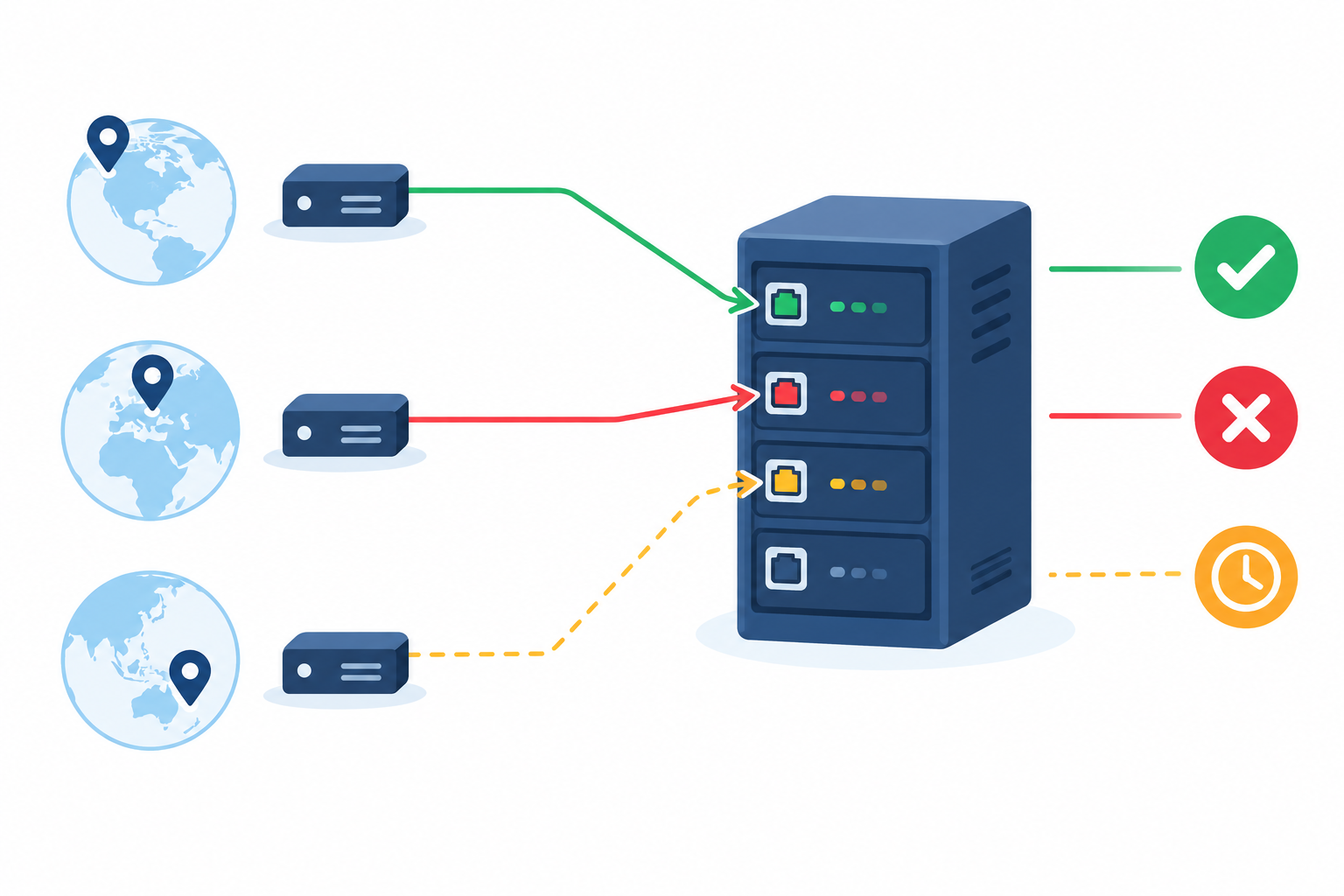
Port monitoring results: accepted, refused or timed out
A port check can end in three ways, and each gives you a clue.
If the connection is accepted, the network path works and something is listening. That something is usually the service you expect, but a basic TCP check can't confirm it. A proxy, load balancer or firewall may be answering on the service's behalf.
If the connection is refused, the host answered but nothing is accepting connections on that port. Often the service has stopped or is bound to a different interface, though a firewall that actively rejects traffic can look the same.
If it times out, there's no answer at all. Think firewall rules that silently drop traffic, a routing problem, or a host that's offline.
The difference between refused and timed out is handy when you're half-awake and deciding where to look first. Treat it as a clue, not a verdict.
What a TCP port check can't prove
A completed connection means something is listening. It doesn't mean it's healthy. A database can accept connections and still reject every login or query. A web server can accept on 443 and return errors. A TCP check can't verify authentication, query execution, replication health or protocol behaviour. Think of port monitoring as a strong first layer, not the whole story.
How to reduce false alarms from port monitoring
One failed connection from one location might be nothing more than a routing blip between that location and your server. If every blip woke you up, you'd stop trusting your alerts, and that's how real outages get missed. Moonitor can verify failures from multiple regions before alerting, which helps filter out one-off network noise. Check your monitor settings for exactly how confirmation works, and bear in mind that no setup removes false alarms entirely.
Setting up a port monitor is straightforward: enter the host and port, choose how often to check, and pick where alerts should go. For intervals, ask yourself how quickly you need to know. A checkout database might justify a check every minute, while an internal tool can happily be checked every five.
How Ping Monitoring Works
Ping is the old reliable of networking. Your monitor sends a small ICMP echo request, basically an 'are you there?' packet, and waits for the reply. It times the round trip and notes whether a reply came back at all.
What does ping monitoring tell you?
A good ping result tells you that an ICMP responder at that address is reachable from the monitoring location, and gives you a round-trip latency figure to track. It suggests the network path is up and the host is probably alive. It isn't proof, though. The reply might come from a firewall, load balancer or other device rather than the machine you care about. Over time you also get packet loss trends, which are often the first hint of a link that's degrading but hasn't failed yet.
What ping monitoring can't tell you
Ping has no idea whether any specific service is running. A host can reply to ping all day while its database is down. It works the other way too: plenty of hosts and firewalls deliberately block or rate-limit ICMP, which can look like downtime when everything is fine. A failed ping on its own isn't proof that a server is down.
When should you use ping monitoring?
Ping earns its keep when there's no web service to check. That covers routers, firewalls, VPN gateways, bare-metal servers and most other network devices. For these, ping is often the simplest signal you can get. It's also useful alongside HTTP and port checks on servers that do run services, because it helps separate 'the network is struggling' from 'the application is struggling'.
Use ping latency to spot network trouble early
Latency and packet loss feed into response-time trends, so you can see a gradual climb before it becomes an outage. If your round-trip time creeps up every evening, or packet loss shows up in small bursts, you've got a warning shot. It's much nicer to investigate on a quiet Tuesday afternoon than during an incident.
A practical tip for ping monitoring and firewall rules
If your server drops ICMP, you don't need to throw the doors open. Allow ICMP echo requests only from your monitoring locations and leave everything else as it was. You get a usable signal without widening your exposure.
Port vs Ping vs HTTP Monitoring: What's the Difference?
Each check answers a different question, and each has its own blind spot.
| Ping | Port | HTTP | |
|---|---|---|---|
| What it tests | ICMP reachability and round-trip time | Whether a TCP listener accepts connections | Whether a web server returns a valid response |
| Question it helps answer | Is something at this address reachable? | Is something listening on this port? | Is the web app responding correctly? |
| What a failure may point to | Network, host or ICMP policy problem | Stopped service, firewall rule, or routing problem | Application, web server, proxy or upstream problem |
| Typical targets | Routers, firewalls, VPN gateways, bare-metal servers | Databases, mail servers, SSH, custom TCP services | Websites, APIs, web apps |
| Common blind spots | Says nothing about services; ICMP may be blocked | A listener isn't proof the service is healthy | Can't see non-HTTP services; CDNs can mask a failing origin |
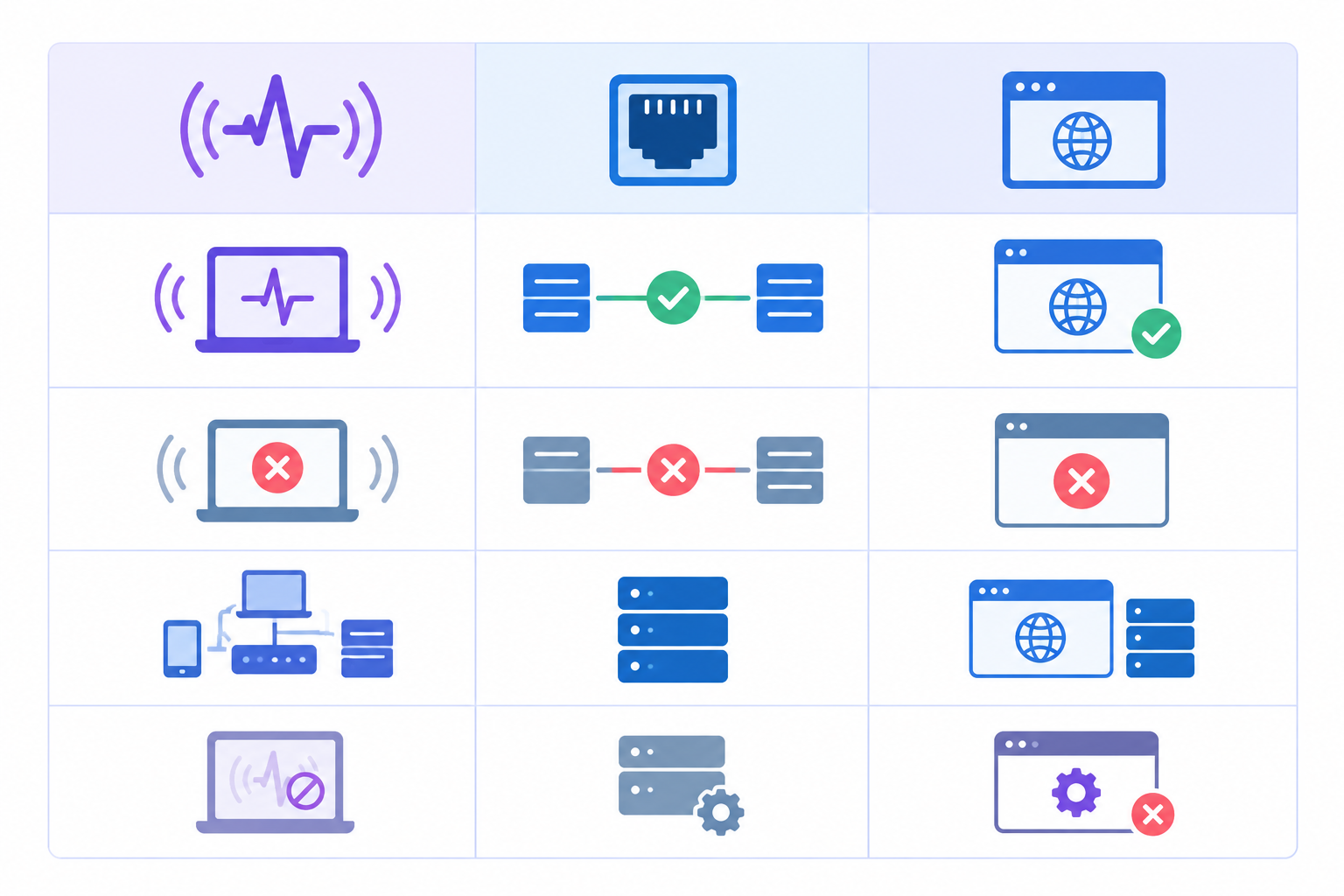
And if you're thinking, 'but what if HTTP says 200 and the page is still broken?', that's what keyword monitoring is for. It looks for specific content on the page, so a friendly error page that returns 200 won't fool it.
Port Monitoring Use Cases: Databases, Mail Servers and More
Let's get practical. These are the places where port monitoring tends to pay for itself.
Monitor database ports
The usual defaults are:
- PostgreSQL: 5432
- MySQL/MariaDB: 3306
- MongoDB: 27017
- Redis: 6379
A port check on these tells you a listener is reachable. Pair it with a deeper check, such as a read-only query through your application, to separate 'listening' from 'actually serving requests'.
One security note, and it matters: don't expose database ports publicly just to make monitoring convenient. Monitor from an approved network location, use allowlists, or check from the application's network. If a database port becomes reachable from the open internet, that's a security problem rather than a monitoring win. For UK organisations, it can also become a data protection concern under UK GDPR if the database holds personal data. Remember too that ports are defaults, not guarantees, so confirm the one your deployment actually uses.
Monitor mail server ports
Mail has more ports than you'd expect:
- SMTP: 25 (server-to-server transfer), 587 (submission) and 465 (submission over implicit TLS)
- IMAP: 143 and 993
- POP3: 110 and 995
A healthy port 25 doesn't mean your users can send via 587, so monitor the routes you actually rely on. A silent mail outage costs you trust long before anyone tells you about it, which makes it one of the best arguments for going beyond HTTP.
Monitor SSH, SFTP, FTP and RDP ports
- SSH and SFTP: 22. SFTP normally runs over SSH, so one port covers both.
- Plain FTP: 21, which is unencrypted and best avoided where you can.
- FTPS: commonly 21 (explicit mode) or 990 (implicit mode), depending on how it's configured.
- RDP: 3389
These are often early warning signs. If SSH stops answering, something is wrong with that server, and you'd rather know before you need to log in to fix something else. Like databases, remote access ports shouldn't be open to the whole internet unless you have a very good reason.
Monitor custom TCP services
Internal APIs, message brokers like RabbitMQ (5672), game servers, IoT gateways and legacy apps all share one thing: no web page to check. A TCP port monitor is often the most practical way to keep an eye on them.
Monitor DNS server availability
If you run your own DNS servers, port 53 is worth watching. It pairs nicely with DNS monitoring, which detects changes to your DNS records. One tells you the server is answering, the other tells you whether the answers have changed.
Port monitoring example: a database outage
Imagine a small UK e-commerce team running their shop on a managed web host with a separate PostgreSQL server. One morning the database process stalls after a bad update. The storefront is cached, so HTTP checks still pass and customers can browse. Ping to the database server still passes too, so the host itself looks fine.
The port monitor on 5432, however, starts failing. Before restarting anything, the team checks whether the same port is reachable from their application server. It isn't. Connections are refused rather than timing out, which suggests the host is up but nothing is accepting connections, so a firewall change looks unlikely. They check the service, find the stalled process and restart it, and checkout errors never pile up. Without the port check, they'd have found out from customer emails. (This is a hypothetical scenario to show how the signals fit together.)

What Ports Should You Monitor on Your Server?
It's tempting to monitor everything. Don't. You only care about the ports your business depends on, and more monitors just means more noise.
Here's a sensible starter list:
- 80 and 443 for web traffic (check 80 for a redirect to HTTPS if you support it)
- 22 for SSH and SFTP
- Your database port, checked from the application network where possible
- Mail ports (25, 587, 993) if you host your own email
- Any custom application port your product relies on
Prioritise by customer impact. If checkout depends on it, it gets a monitor today. If it's the staging wiki, it can wait a week.
And if a port shouldn't be reachable from the internet, treat that as a security question, not a monitoring one. Fix the firewall rule rather than monitoring around it.
A simple port monitoring audit
- List your firewall rules and security groups.
- List the services actually listening on each server.
- Match each business-critical service to a monitor.
- For anything listening that you can't explain, investigate before you add a check.
That last step often turns up surprises, and it's a good way to spend an afternoon.
Combining Port, Ping and HTTP Checks for Server Monitoring
No single check tells the whole story, but together they help you narrow down a problem quickly. They won't give you a neat diagnosis every time, though. Load balancers, proxies, CDNs and firewalls can all change what each probe sees, so read the results as clues.
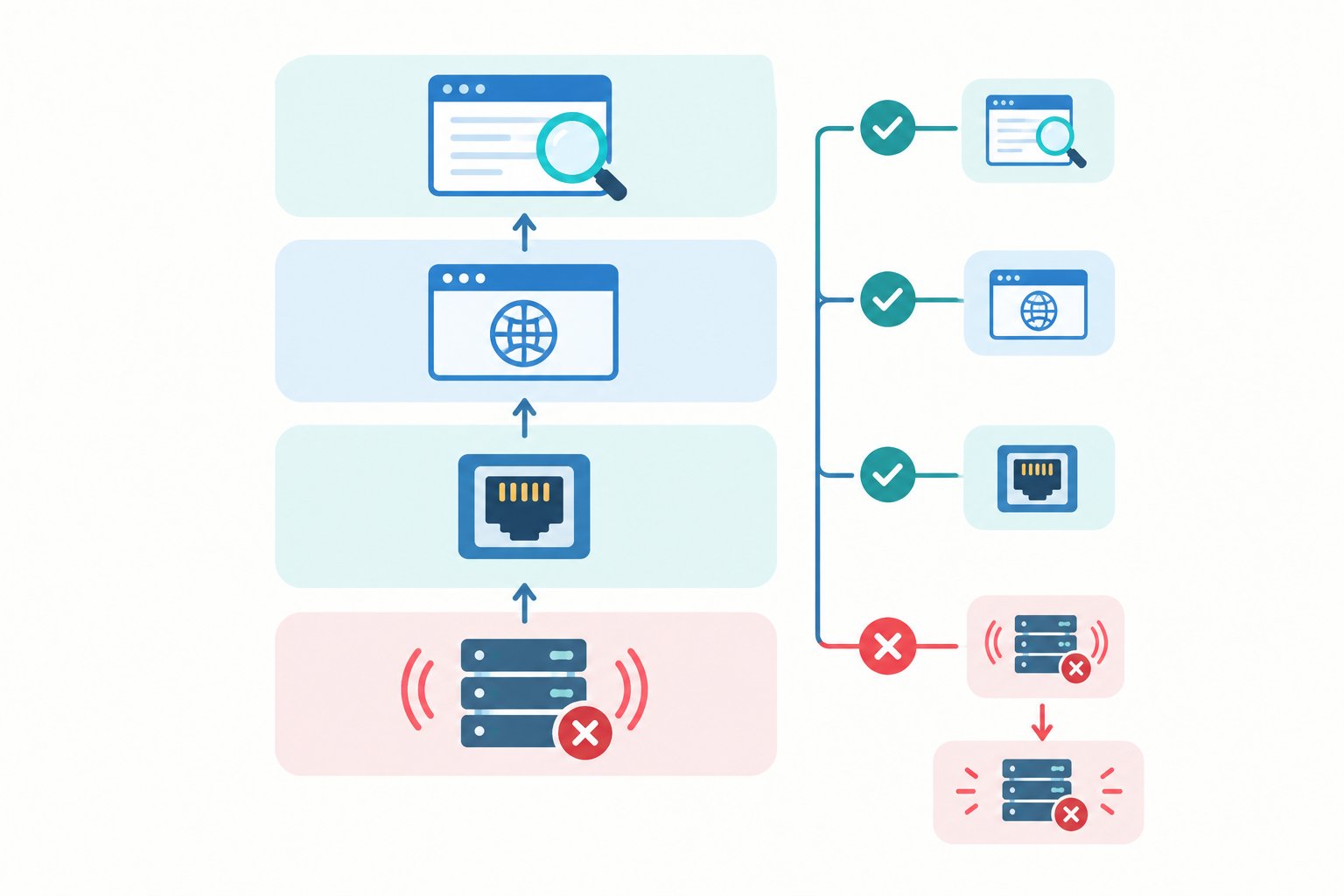
- Build the layers. Use ping for network reachability, port checks for services, HTTP for the application, and keyword monitoring for correct content.
- Read the pattern of failures as clues.
- Ping fails: possibly a network or host problem, or ICMP being blocked. Check your port monitor before assuming the server is down.
- Ping passes, port fails: the address is reachable, but the service may have stopped or a firewall may be blocking that port. Check from a second location or the application network.
- Port passes, HTTP fails: something is accepting connections, but the application may be misbehaving. Look at the app, and at any proxy or load balancer in front of it.
- HTTP passes, keyword fails: the page responds but the content looks wrong.
- Validate before concluding. Compare results across probe locations, review recent firewall or deployment changes, and run an application-level check, such as a test query, before settling on a root cause.
- Add complementary monitors. Fuller server monitoring includes SSL certificate monitoring so certificates don't expire on you, domain expiry checks, and heartbeat monitoring for cron jobs and backups. A silently failed backup is the kind of thing nobody notices until they need it.
- Set sensible alert routing. Send critical ports to Slack, Discord, Telegram or a webhook for whoever is on call, and let lower-priority hosts send an email. Not everything deserves a 3am ping.
- Publish relevant components on a status page. A branded status page with incident history lets customers see what's happening without you writing updates by hand mid-incident.
Start small. One database port check and one ping check on your most important host will already change how quickly you can answer 'what's actually broken?'
If you'd like to try it, add a port monitor and a ping monitor next to your existing HTTP checks. Moonitor offers a free trial, so check the current terms on the pricing page, and see for yourself how much more the layers tell you.
Frequently Asked Questions About Port and Ping Monitoring
What's the difference between port and ping monitoring?
Ping monitoring sends an ICMP echo request to check that something at an address is reachable and to measure latency. Port monitoring attempts a TCP connection to a specific port to check that a listener, such as a database or mail server, accepts connections. Ping tells you the address is reachable, while port monitoring tells you something is listening where you expect your service to be. Neither proves the service is fully healthy.
Can I monitor a database server without HTTP checks?
Yes. A TCP port check on your database port, such as 5432 for PostgreSQL or 3306 for MySQL, confirms a listener is accepting connections without needing a web endpoint. For deeper assurance, pair it with a check that exercises a real query path in your application, since an open port doesn't prove logins and queries work.
When should I use ping instead of HTTP checks?
Use ping monitoring when the target has no web service, such as routers, firewalls, VPN gateways or bare-metal servers, or when you want a quick signal about network reachability and latency. If the host does run a web app, use ping alongside HTTP so you can better tell a network problem from an application problem.
What ports should I monitor on my server?
Start with the ports your business depends on: 80 and 443 for web traffic, 22 for SSH and SFTP, your database port, mail ports like 25, 587 and 993 if you host email, and any custom application ports. Skip ports that aren't meant to be public, and review your firewall rules to make sure each critical service has a monitor.
Why do ping checks sometimes fail when my server is fine?
Some hosts and firewalls block or rate-limit ICMP traffic, which can look like downtime. Routing problems between the probe and your server can have the same effect. Allow ICMP from your monitoring locations if you want ping results, and cross-check with a port or HTTP monitor and, where available, multi-region verification before treating a single failed ping as an outage.