
Cron Job Monitoring Best Practices to Avoid Silent Failures: A Practical Checklist
Follow cron job best practices with heartbeat monitoring, sensible grace periods, duration tracking and tested alerts to catch silent failures early.
Cron Job Best Practices for Monitoring: A Practical Checklist to Avoid Silent Failures
Meta description: Cron job best practices for UK teams: use heartbeat monitoring, sensible grace periods, duration tracking and tested alerts so silent failures get caught early.
The most important cron job best practice is to monitor for a job's absence, not just its errors. Have every run ping a heartbeat monitor, set a sensible grace period, track how long runs take, and test your alerts on a schedule. Do that and a job that quietly stops running becomes an alert instead of a nasty surprise weeks later.
That's the short version. The rest of this post is a checklist you can work through with your own jobs, with the reasoning behind each item so you can adapt it to your setup. Grab a cuppa and let's go ☕
Why cron jobs fail silently (and why it hurts so much)
Picture this. A small team has a nightly database backup running at 02:00. It's been humming along for a year. Then one Tuesday, a server gets rebooted for patching, the cron daemon doesn't come back the way everyone assumed, and the backup stops. Nobody notices. The website's fine, the server's healthy, the dashboards are green. Three weeks later someone needs to restore a table and discovers the newest backup is 21 days old.
I've heard versions of this story more times than I'd like. It's rarely about carelessness. It comes down to how cron works.
Cron on its own doesn't give you reliable missed-run or incident alerting. Many implementations can email a job's output to a local user if you've configured mail, and that's handy for noisy failures. But mail only fires when a job runs and produces output. If the job never starts, because the daemon is down, the crontab is gone or the server was off, there's nothing to send. And that nothing looks exactly like success. No red banner, no angry email, no pager buzz. Just a gap where something should have been.
Common causes of silent cron job failures
Most silent failures come from a fairly short list of causes:
- Server reboots where the scheduler or the environment doesn't come back as expected
- Expired credentials, such as an API token or database password that quietly lapsed
- Full disks that make a script fail before it can write anything useful
- Changed paths or environment variables, often after an upgrade
- A crashed or stopped cron daemon
- A deploy that wiped the crontab, which happens more often than anyone admits
Why uptime monitoring won't catch a missed cron job
You might be thinking, 'But I already have website monitoring and server monitoring.' Good, you should. But those tools answer different questions. Your site is up, your server is responding to pings, CPU and memory look fine, and the job is still dead. Uptime monitoring checks that something is available. It can't tell you whether something that was supposed to happen actually did.
So we need a different approach. Let's build it up piece by piece.
Use heartbeat monitoring as your foundation
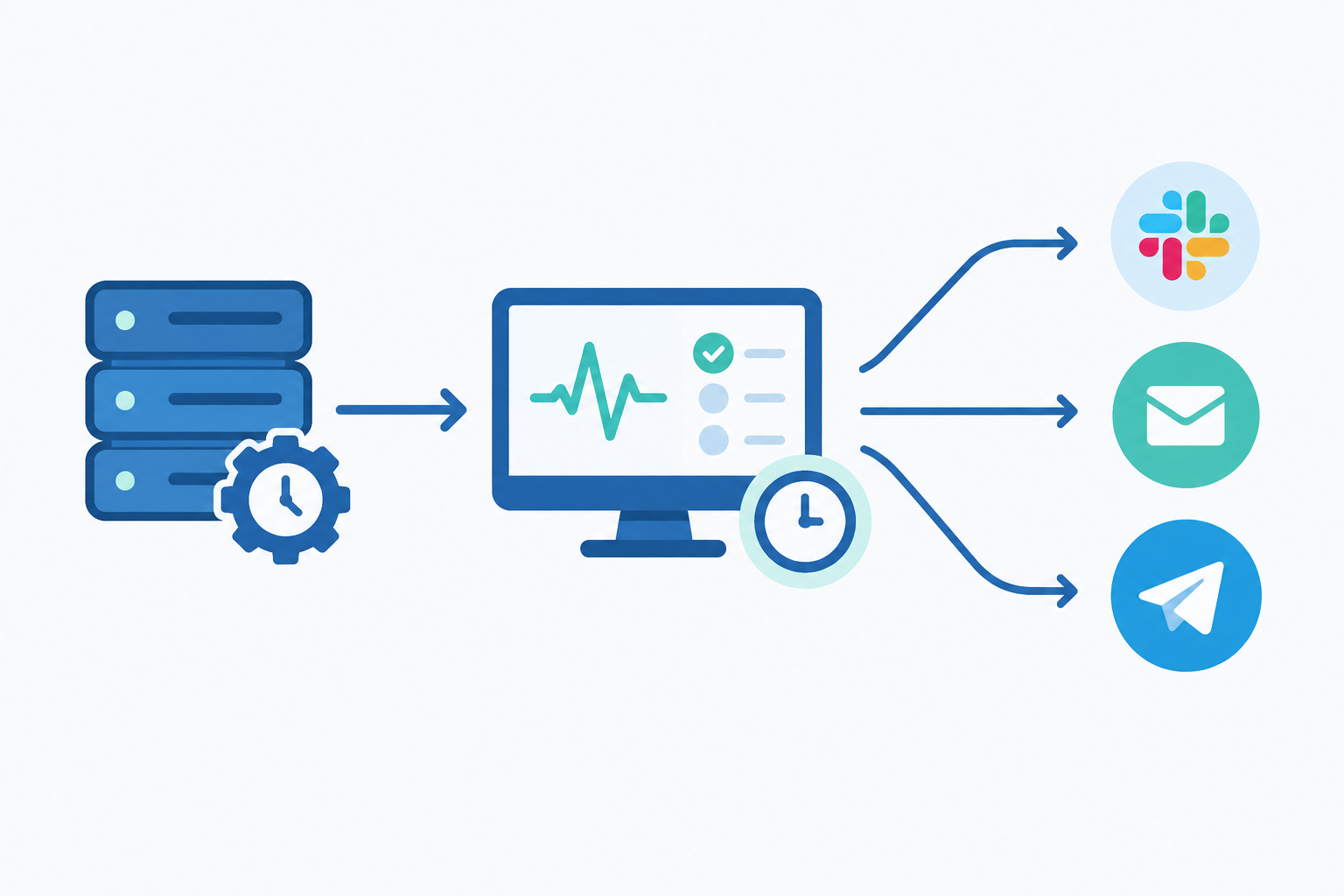
Heartbeat monitoring flips the usual model. With traditional uptime monitoring, the monitor reaches out and checks your service. With heartbeat monitoring, your job checks in with the monitor.
Here's how it works. You create a heartbeat monitor and get a unique URL. At the end of a successful run, your job sends a request to that URL. The monitor knows when it expects to hear from you, and if the ping doesn't arrive on time, it raises an alert. Silence becomes the signal.
Adding it to an existing crontab line takes one extra command:
0 2 * * * /usr/local/bin/backup.sh && curl -fsS -m 10 --retry 3 https://your-heartbeat-url > /dev/null
That && matters. It chains the two commands so the ping only fires if the backup script exits with status 0. If the script fails, no ping goes out, and the missed heartbeat triggers your alert. The -m 10 and --retry 3 flags stop the ping itself from hanging or failing on a single network blip. If the ping still can't get through after retries, the monitor will report the job as late even though the work was done, so when a late alert comes in, check connectivity as well as the job.
A heartbeat only proves what your script checks
Here's the catch. && only looks at the script's exit status. It has no idea whether the backup file is sensible. A script that connects to an empty database, finds no input files and exits 0 will happily send a success ping.
So make the script earn its zero. Have it exit non-zero when required work is missing or incomplete, and check something meaningful before it finishes: the output file exists and isn't suspiciously small, the row count is above a floor, the upload really landed. A heartbeat confirms your configured success condition, not business correctness by itself. It's only as honest as the conditions you give it.
Use one heartbeat monitor per cron job
Here's a habit worth building from day one: give every job its own monitor. It's tempting to share one heartbeat across several tasks, but then a single healthy job can mask a dead one. Separate monitors also make alerts self-explanatory.
In Moonitor, a cron/heartbeat monitor sits alongside your HTTP, API, SSL and DNS monitors in one dashboard, so you can see your website, your API and your nightly billing run in the same place.
Log every cron job run, not just failures
Many teams only log errors. It feels efficient, but it leaves you blind. If there's no record at all, you can't tell 'failed quietly' from 'never started', and that distinction is often the whole investigation.
Here's what good run logging looks like:
- Record the basics for every run: start time, end time, exit code and a short summary, such as rows processed or files written.
- Send output somewhere persistent and searchable. Local mail and log files that rotate away are easy to lose, usually just when you need them.
- Use start and finish signals so you can tell a job that never began from one that began and hung.
- Keep incident history. Patterns jump out over time, like failures that always land on the first of the month, or always follow a Friday deploy.
- Redirect stderr as well as stdout. Plenty of failures only show up there.
That last tip is a quick win. Something like /usr/local/bin/report.sh >> /var/log/report.log 2>&1 captures both streams in one place. Without the 2>&1, the most useful error messages can vanish into the void.
Alert on missed cron job runs, not just errors
A scheduled job can fail in two different ways:
- It runs and errors. The script starts, hits a problem and exits non-zero.
- It never runs at all. The crontab is gone, the daemon is down, or the server was off.
Error-only alerting handles the first type and is completely blind to the second. The second is often the more dangerous one, because it can go on for weeks with no evidence whatsoever.
This is the 'dead man's switch' idea in plain English. Rather than waiting for the job to tell you something went wrong, you expect it to keep saying 'I'm fine'. When it stops talking, you assume the worst.
For full coverage, pair both approaches:
- Explicit failure signals, sent when the job exits non-zero, so you hear about loud failures immediately rather than waiting for the grace period to expire
- Missed-heartbeat alerts, which catch everything else, including the failures nobody predicted
Send cron job alerts where people actually look
An alert nobody sees is just a log line. Route alerts to wherever your team genuinely pays attention: Slack, Discord, Telegram, email, or a webhook into your on-call tooling.
Priority matters too. Critical jobs like backups and billing should go to a loud channel that people notice quickly. Lower-priority jobs, such as a weekly stats email, can go to a quieter one. If everything shouts equally, people learn to ignore all of it.
Set realistic grace periods for cron job monitoring
A grace period is the extra buffer between when a job is expected to have checked in and when you're alerted that it's late. It's easy to get wrong, mostly because two different numbers get blurred together: how long the job normally takes, and how much slack you allow on top.
- Too short, and you get false alarms and alert fatigue. Soon people start muting the channel.
- Too long, and real problems stay hidden for hours.
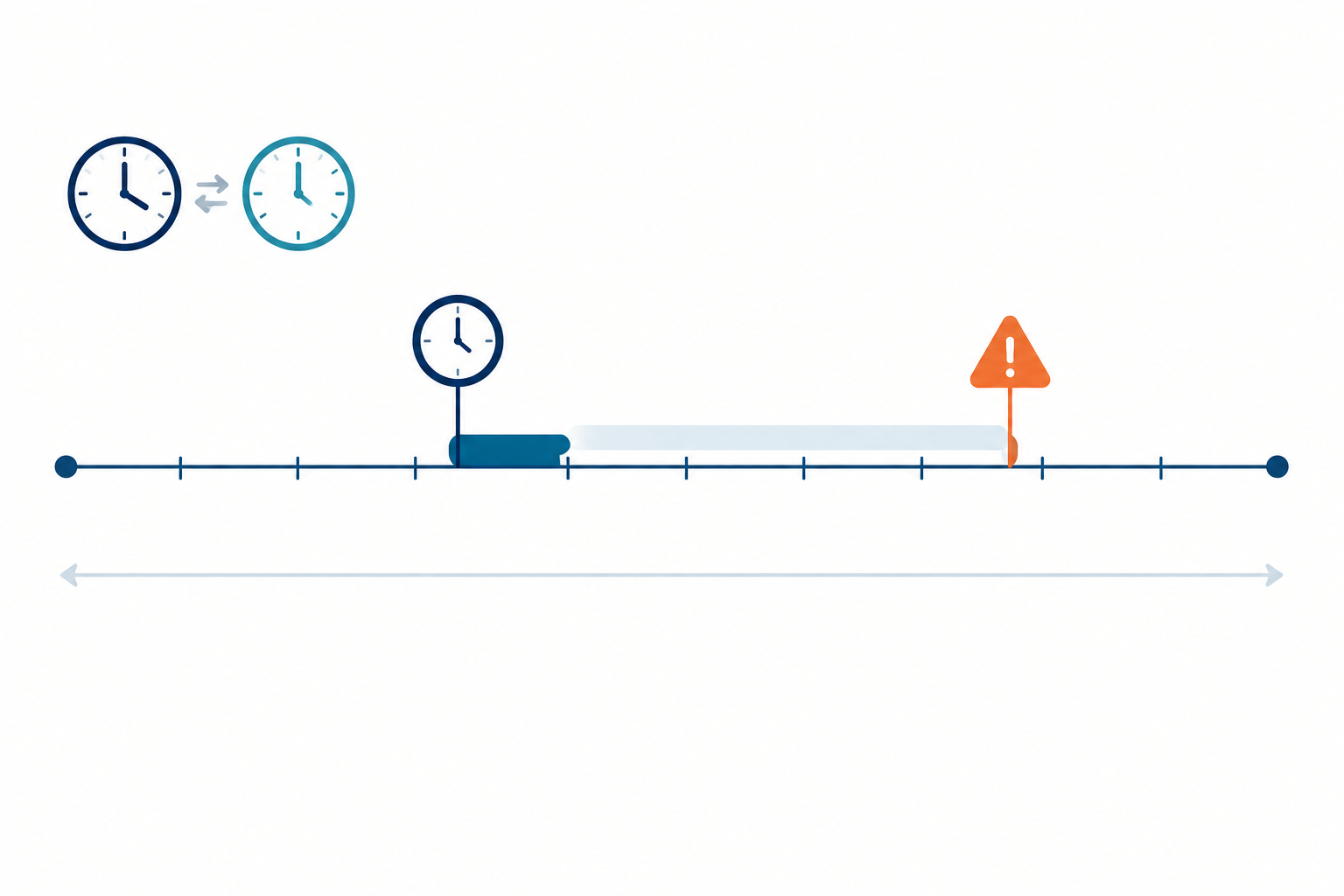
Let's use a worked example. Say your backup starts at 02:00, normally takes 10 to 20 minutes, and pings the monitor when it finishes:
- Expected check-in: 02:20, based on your slowest normal run
- Grace period: a further 30 minutes
- Alert fires at: 02:50, if no ping has arrived
That gives you comfortable headroom for a slow night while still telling you well before breakfast that something's wrong. Watch out for one trap. If your monitor's schedule is anchored to the job's start time (02:00) rather than its expected finish, the runtime has to be included in the window. Otherwise you'll either alert in the middle of a perfectly normal run or count the runtime twice and wait far too long.
How to choose a grace period for a daily job
Base the expected check-in on your slowest normal run, not the average, and then add a grace period on top. Averages hide the busy nights, and busy nights are exactly when you'll get paged for nothing. For critical jobs, 30 minutes is a sensible starting point. For less urgent ones, an hour or more is fine.
Think about variable load too. A month-end report might take three times as long as a mid-month one. Either give that job a more generous window or treat it as a separate monitor with its own expectations.
Suggested grace periods by cron job type
| Job type | Typical expectation | Suggested starting grace |
|---|---|---|
| Frequent sync (every 5 to 15 minutes) | Ping after every run | A couple of missed intervals, so one slow run doesn't page anyone |
| Nightly backup or billing run | Ping on completion, slowest normal run | 30 minutes |
| Weekly report or stats email | Ping on completion | 1 to 2 hours, quieter alert channel |
| Month-end batch | Ping on completion, allowing for 3x load | Separate monitor with a generous window |
Treat these as starting points rather than rules, and adjust with real data.
Account for UK clock changes: GMT, BST and cron schedules
If you're in the UK, the clocks going forward in March and back in October can affect jobs scheduled in local time. Exactly what happens depends on your cron implementation and timezone configuration. A job set for 01:30 might run twice in October or be skipped in March on some setups, while others compensate in their own way. Don't assume. Check how your system behaves.
One common fix is to run your servers and schedules in UTC. UTC has no clock changes, so you avoid skipped or repeated wall-clock times. The trade-off is that a fixed UTC schedule shifts by an hour relative to UK local time across the year: 02:00 UTC is 02:00 in winter but 03:00 in summer. That's fine for a backup. But if a job has to run at a specific local time, such as 09:00 for a customer-facing email, choose the behaviour you want, test it around the changeover, and make sure your monitor's expected time follows the same rule.
Review and refine cron job grace periods
Don't agonise over the first number you pick. Start sensibly, collect a few weeks of real data, then revisit and tighten gradually. Unlike an HTTP check, where a monitor can retry from several locations to rule out a blip, a heartbeat depends on your job checking in. Getting the grace period right is your main defence against noise.
Monitor cron job duration, not just completion
Should you track how long a job takes as well as whether it finished? Yes. A job that 'succeeds' in two seconds when it normally takes twenty minutes probably did nothing useful. Maybe it connected to an empty database, or found no input files and shrugged. The exit code says zero, but the work didn't happen. Duration is one of the cheapest ways to catch exactly the gap we talked about in the heartbeat section.
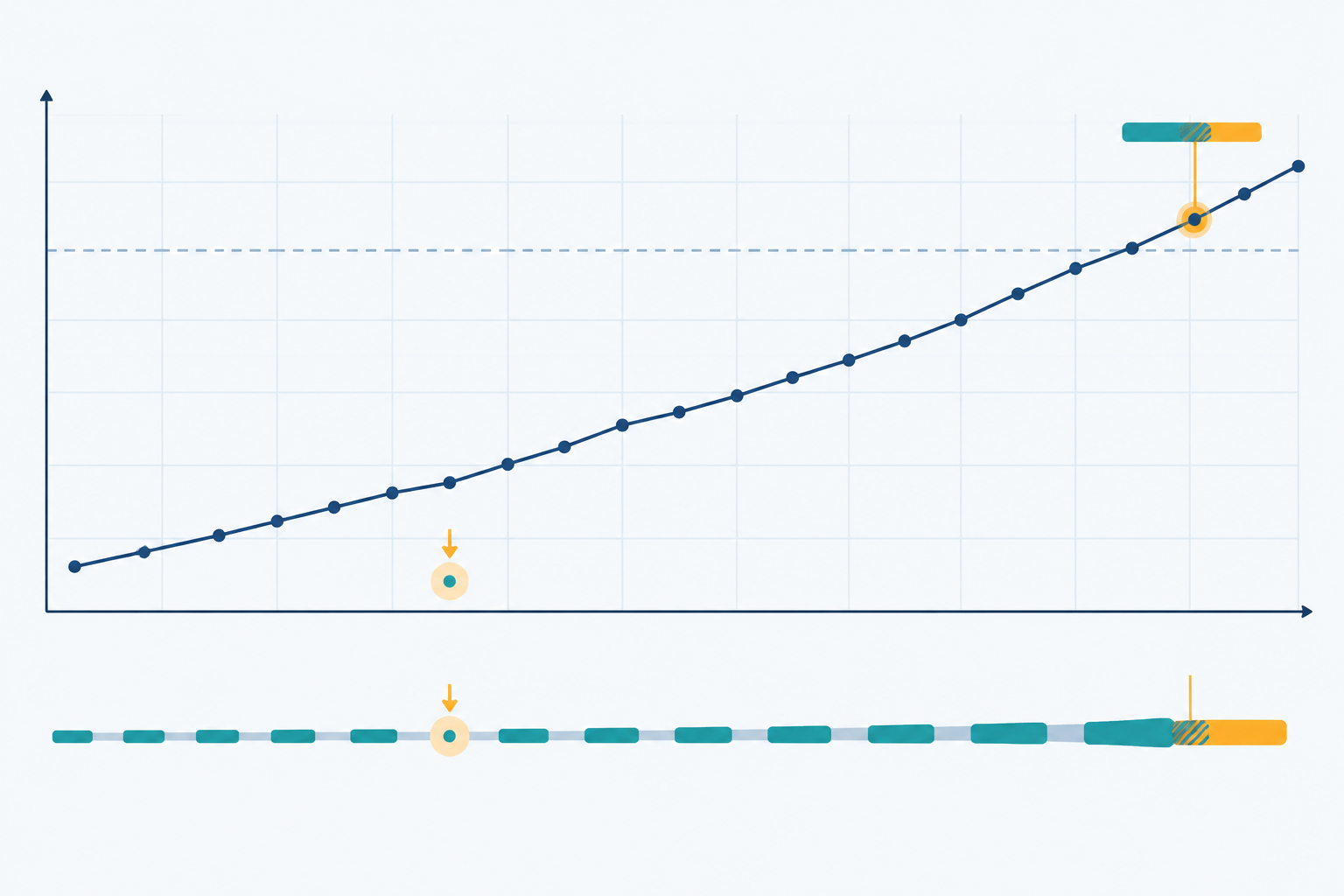
The opposite problem is just as sneaky. Jobs creep. A task that took 5 minutes last spring now takes 55, and one day it starts overlapping with the next scheduled run. Now two copies are fighting over the same files or tables, and things get messy fast.
How to measure cron job runtime
If your heartbeat monitor supports start and finish signals, you can send one when the job begins and another when it ends. The gap between them is your runtime. From there you can flag runs that are suspiciously short or unusually long, and spot a job that started but never finished. An outcome check inside the script, such as a minimum record count, makes this even better.
Prevent overlapping cron job runs
Even with good monitoring, it's wise to stop two instances running at once. On Linux, flock is the classic tool:
*/15 * * * * flock -n /tmp/sync.lock /usr/local/bin/sync.sh
With -n, a new run simply exits if the previous one still holds the lock, rather than piling on. Decide up front whether a skipped run counts as a failure. Usually it doesn't, since the earlier run is still going, but if it keeps happening, the job is outgrowing its schedule. Log skipped runs distinctly so they don't look like genuine errors (newer versions of flock let you set a specific exit code with -E to tell 'skipped' from 'script failed'), and let your duration monitoring flag the run that's taking too long.
Track cron job runtime as a trend
Think of job runtime the way you'd think about latency in API monitoring. A single number matters less than the direction it's heading. If a database export grows steadily over several months, that's an early warning to act on while it's still a small task, not after it's blown through your maintenance window.
Make cron jobs easier to monitor
Monitoring is much easier when the jobs themselves are well behaved, and a bit of housekeeping goes a long way:
- Make jobs idempotent, so a retry or accidental double run doesn't cause damage.
- Use absolute paths and set environment variables explicitly. Cron's environment is minimal, and 'works in my terminal' is the root of many silent failures.
- Exit with meaningful non-zero codes, and use
set -euo pipefailin shell scripts so errors aren't swallowed halfway through. - Add timeouts so a hung job fails rather than waits forever.
- Keep schedules documented and your crontab in version control. That also protects you from the deploy-that-wiped-the-crontab scenario.
- Stagger jobs so everything isn't firing at midnight and competing for resources.
- Name monitors clearly, for example
prod-db-backup-nightly, so the 3am alert makes sense to a half-asleep human.
None of this is glamorous, but it removes a surprising number of failure modes before they ever reach your alerts.
Test cron job alerts regularly
Here's a gentle truth: an untested alert is just a hopeful guess. Plenty of teams set up monitoring, never see it fire, and assume that means everything's fine. Then the day it matters, the Slack webhook turns out to point at a channel that was archived in the spring.
Here's a simple routine to keep your alerting honest:
- Create a test monitor and let it miss a heartbeat on purpose. Confirm the alert actually fires.
- Check where the alert lands. Does it reach the right person and the right channel? Is it clear which job failed and what to do next?
- Break a real job in staging. Rename the script or revoke a credential, then confirm that both your failure alert and your missed-run alert work.
- Verify recovery notifications. When the job checks in again, you should hear that it's back to normal.
- Put a quarterly reminder in the calendar. Re-test any time you change channels, webhooks or team members, too.
- Run a short post-incident review whenever a failure was missed, and update your checklist with what you learned.
It takes maybe half an hour a quarter. Compare that to the cost of discovering a dead billing job at month-end.
Cron job best practices checklist
Here's everything in one place. Work through it with each of your jobs, and don't worry if you can't tick every box today. Even getting through the first few is a big step forward.
- Every job has its own heartbeat monitor
- Success pings only fire after the script's own success checks pass
- Failures send an explicit failure signal as well
- Every run is logged, with start, end, exit code and output
- Expected check-in time and grace period are set separately from real run times
- Duration is tracked, and unusually short or long runs are flagged
- Overlap protection and timeouts are in place
- Alerts go to channels people actually read
- Alerts are tested at least quarterly
- Monitors are reviewed whenever jobs are added, changed or retired

If you'd like a hand with the heartbeat side, Moonitor's cron job monitoring is a good place to start. There's a 7-day free trial with no credit card needed, and you can run it alongside your uptime, SSL certificate and DNS monitoring so your scheduled jobs, websites and infrastructure all live in one dashboard. Your future self, the one who isn't restoring a three-week-old backup, will thank you 🙂
Frequently asked questions about cron job best practices
What are the best practices for monitoring cron jobs?
In short: one heartbeat monitor per job, alerts for missed runs as well as errors, logs for every run, and alerts you've actually tested. The sections above explain how each piece catches a different kind of failure, from jobs that fail loudly to jobs that quietly stop running.
How do I choose a grace period for a daily cron job?
Work out when the job should have finished on its slowest normal night, then add a buffer on top. For a backup that starts at 02:00 and takes 10 to 20 minutes, that means expecting a ping by 02:20 and adding 30 minutes, so the alert fires at 02:50. If your monitor counts from the start time instead, make sure the window includes the runtime. After a few weeks, tighten it if it's too lax, or loosen it if you get false alarms.
Should I monitor cron job duration as well as success?
Yes. A job can exit with status 0 after doing almost no work, or slowly stretch until it overlaps with the next run. Flag runs that are far shorter or longer than usual, and look at the trend over months rather than a single run.
How do I test that my cron job alerts actually work?
Deliberately skip a test monitor's heartbeat and check the alert arrives in the right channel with enough detail to act on. Then break a real job in staging to test failure signals, confirm you get a recovery notification, and repeat every quarter or after any change to channels, webhooks or team members.
Does cron job monitoring replace uptime or server monitoring?
No. Website, API and server monitoring tell you whether services are reachable, while heartbeat monitoring confirms scheduled work happened. A server can be perfectly healthy while its backup job has been dead for weeks, so most teams need both.
What happens to cron jobs when the clocks change in the UK?
It depends on your cron implementation and timezone settings. Jobs scheduled in local time may run twice, be skipped or shift by an hour in March and October. Running schedules in UTC avoids skipped or repeated times, but a fixed UTC time will drift by an hour against UK local time through the year. If a job must run at a specific local time, test the behaviour around the changeover and make sure your monitor's expected time follows the same rule.