
Heartbeat Monitoring for Backups: How to Verify Every Nightly Job
Heartbeat monitoring for backups: learn to verify nightly jobs, ping only on success, signal failures explicitly and catch missed backups before restore day.

Heartbeat Monitoring for Backups: How to Verify Every Nightly Job
The most reliable way to know a backup ran is heartbeat monitoring: the job checks in with a monitor only after it finishes successfully. If that check-in doesn't arrive inside an expected window, you get alerted. Add an explicit failure signal and a sensible grace period, and you'll hear about a broken backup the next morning instead of on the day you need to restore.
That's the idea in a nutshell. The details are where nightly job monitoring either works well or quietly lets you down, so let's walk through them together.
Why nightly backup failures go unnoticed 😬
Picture this. A developer is called in on a Monday because a bad migration has wiped a database table. No problem, they think, we have nightly backups. They open the backup bucket and the newest file is six weeks old. Nobody noticed, because nothing ever complained.
Versions of this story turn up again and again in postmortems and forum threads. Cron is brilliant at starting jobs and terrible at telling you whether they worked. If the job runs and fails, you might get a local mail message nobody reads. If the job never runs at all, you get nothing. Silence looks exactly like success.
The causes are usually boring ones:
- Database or storage credentials expired or were rotated
- The disk filled up halfway through the dump
- A path changed in a refactor, so the script now backs up an empty directory
- The cron daemon stopped after a reboot, or the crontab vanished when the server was rebuilt
- A network timeout ended the upload early
It gets expensive at scale, too. GitLab's January 2017 database incident is a well-known example. According to their published postmortem, after data was accidentally removed from the wrong database server, the team found that their regular pg_dump backups had been failing, and that the emails meant to warn them about it weren't arriving. Other recovery options turned out to be unavailable or unsuitable, and they ended up restoring from a snapshot taken about six hours earlier, losing roughly that much data. My takeaway is narrower than "nobody checked". A backup that fails silently, paired with an alert path nobody has confirmed works, gives you false comfort.
Why uptime monitoring can't verify a backup
Here's the awkward bit. Your website can be perfectly healthy while your backups are dead. Standard uptime checks (HTTP, ping, port) ask "is this thing responding right now?" A backup job doesn't respond to anything. It runs for twenty minutes at 2am and goes away again.
So we flip the model. With heartbeat monitoring, you don't alert on the presence of an error. You alert on the absence of a signal. No check-in, no calm. That catches the crashed server, the dead cron daemon and the vanished crontab, none of which can report their own failure.
How heartbeat monitoring works in plain English
The concept is pleasantly simple:
- The monitor gives you a unique URL.
- Your job requests that URL when it finishes (a "ping" or "check-in").
- If the ping doesn't arrive when expected, the monitor raises an alert.
With active checks, the monitor reaches out to your service. With a heartbeat, your job reaches out to the monitor. That's why it suits anything without a public address: backups, report generators, log rotation, data syncs and other scheduled tasks. Moonitor's cron and heartbeat monitors sit in the same dashboard as its website, API, server, SSL certificate and DNS monitoring, so your public site and your 2am database dump can share alert channels and incident history.
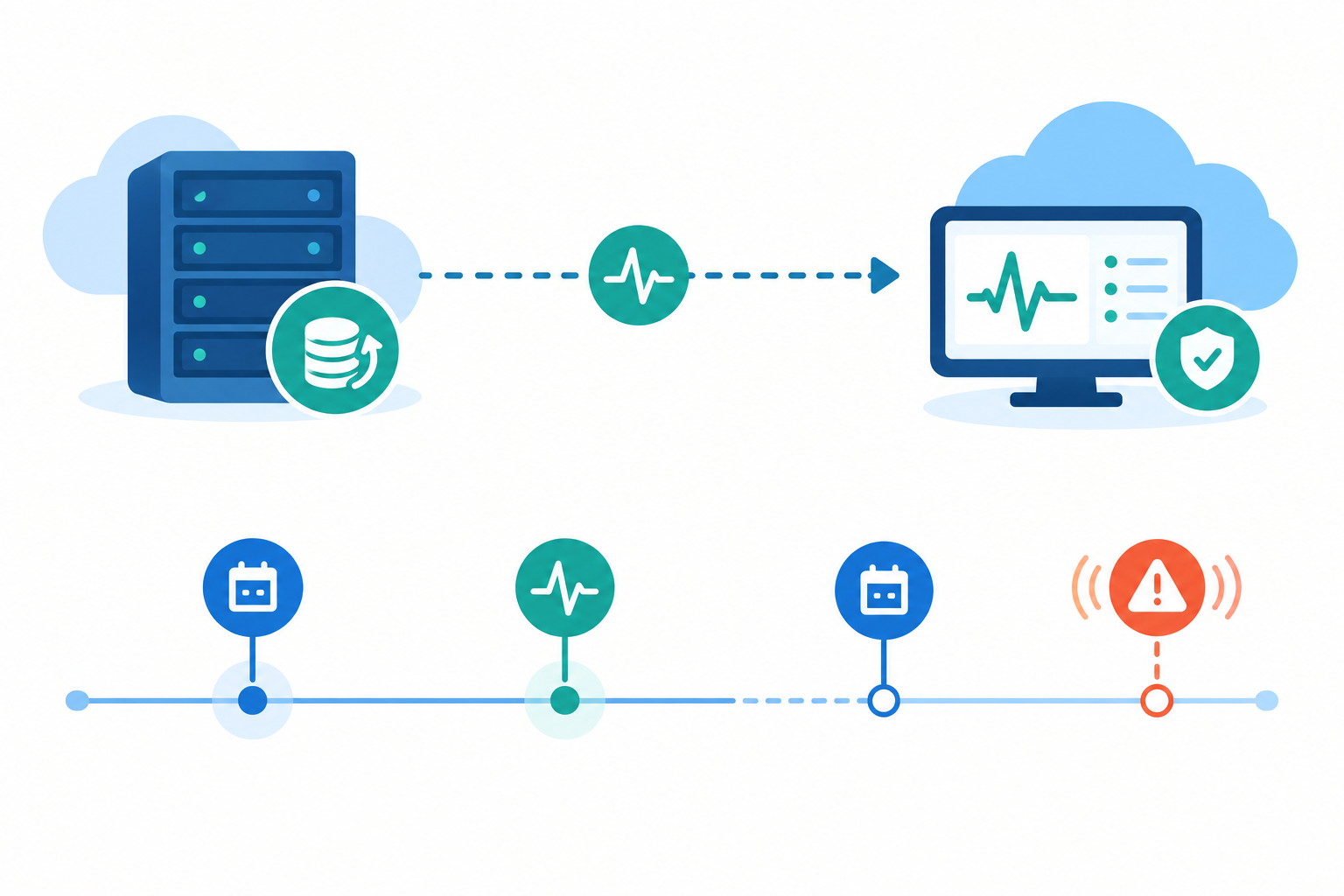
The smallest possible version is one line appended to a backup script:
./backup.sh && curl -fsS -m 10 --retry 3 "$HEARTBEAT_URL"
Those curl flags matter a little. -f fails on HTTP errors, -sS keeps output quiet but still shows errors, -m 10 stops it hanging forever, and --retry 3 gives a flaky network a few chances.
One note on $HEARTBEAT_URL: it usually contains a unique token, so anyone who has it can send a fake "all good" signal. Treat it like a password. Keep it out of source control, load it from an environment variable or a permission-restricted secrets file, and don't print it into logs.
Heartbeat monitoring: ping on success, not on start
The question I get most often is whether the ping should happen before or after the job. After. Here's why and how.
Step 1: Chain the ping to the job
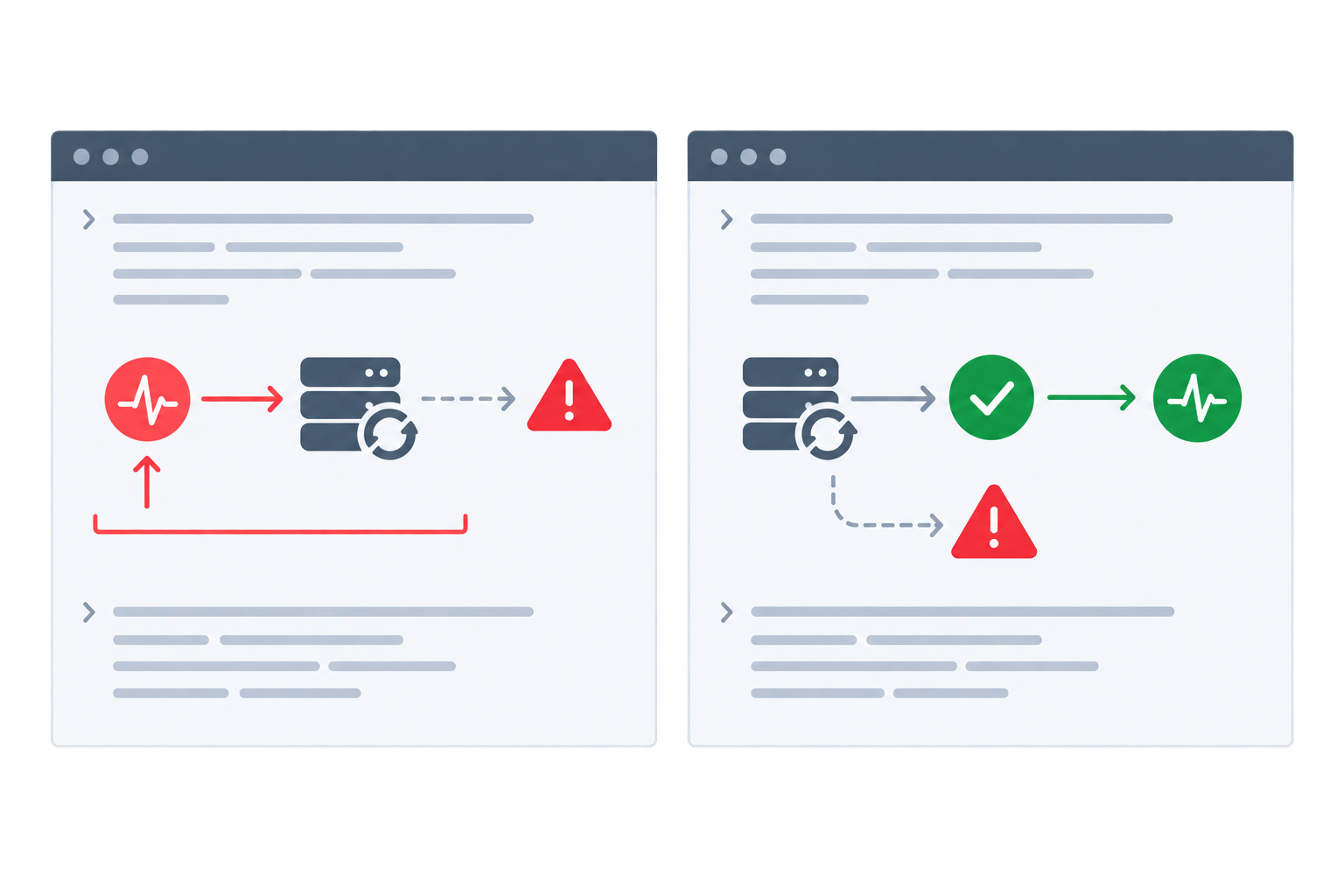
A ping at the beginning only proves that cron fired and the script launched. The backup could crash on line two and your monitor would show a happy green tick. That's exactly the false comfort we're trying to escape.
The && operator runs the next command only if the previous one exited with status 0. If backup.sh fails, the ping never fires, and the missed check-in becomes your alert.
Step 2: Make the backup script stop on errors
For a realistic nightly script, you want errors to halt everything before the ping is reached. You also don't want a half-written file sitting in your backup folder looking like the real thing. Here's a pattern I like:
#!/usr/bin/env bash
set -euo pipefailTreat the heartbeat URL like a password: load it from the environment
PING_URL="${HEARTBEAT_URL:?HEARTBEAT_URL is not set}"
FINAL_FILE="/backups/prod-$(date -u +%F).sql.gz"
TMP_FILE="${FINAL_FILE}.partial"
dump to a temporary name; pipefail means a pg_dump failure isn't hidden by gzip
pg_dump "$DATABASE_URL" | gzip > "$TMP_FILE"
(validation checks go here; see the section on empty backups below)
promote the file only once the dump has completed and been checked
mv "$TMP_FILE" "$FINAL_FILE"
upload to remote storage
aws s3 cp "$FINAL_FILE" s3://my-backups/
only reached if everything above succeeded
curl -fsS -m 10 --retry 3 "$PING_URL"
set -e makes the script exit when most commands fail, though not all of them (more on the exceptions in a moment). -u treats unset variables as errors, and pipefail makes a pipeline fail if any stage fails. Without that last one, pg_dump can crash and gzip will happily report success on an empty stream. Writing to a .partial file and renaming it only at the end means a crash mid-dump can't leave something that looks like a valid backup.
Step 3: Watch for common shell script gotchas
set -e helps, but it isn't a guarantee. Keep these in mind:
- Conditions and lists.
set -eis ignored for commands tested in anif,whileor&&/||list, and a failure inside( ... )or a command substitution may not stop the parent script the way you expect. - Swallowed exit codes. A stray
|| true, a wrapper that always ends withexit 0, or a;where you meant&&will let the ping fire after a failure. - Last-command syndrome. A script's exit code is that of its final command, so don't end on something harmless like
echo done.
Where a failure really matters, check the status explicitly rather than relying on set -e alone. And deliberately break your script once (point it at a bad password, say) to confirm the ping does not fire.
Step 4 (optional): Add a start signal to track job duration
If you want to know how long jobs take, send a start ping too. That lets you spot a backup creeping from 20 minutes to 90. Just keep the rule clear: the success ping is the source of truth. A start signal says the job began, and only the success ping says it worked.
Signalling explicit backup failures
A missed heartbeat is a perfectly good safety net, but it's slow. If your job fails at 02:05 and your alert window doesn't close until 02:50, you're waiting the best part of an hour to hear about something the script already knew. Reporting failure immediately is faster and gives you more to work with.
Send a failure signal from an exit trap
The tempting choice is Bash's ERR trap, but it has exceptions. It doesn't fire for commands used in if or while conditions or most && / || lists, and functions and subshells don't inherit it unless you enable set -E. An EXIT trap that checks the exit status is more dependable, because it runs when the script ends through a failed command under set -e, an explicit exit 1 or a catchable termination signal. Add it after PING_URL and TMP_FILE are defined:
## Illustrative only: set HEARTBEAT_FAIL_URL to the failure endpoint
## (and request format) your monitor documents; it varies between services
FAIL_URL="${HEARTBEAT_FAIL_URL:?HEARTBEAT_FAIL_URL is not set}"report_failure() {
  code=$?
  rm -f "$TMP_FILE"   # don't leave partial backups behind
  if [ "$code" -ne 0 ]; then
    curl -fsS -m 10 --retry 3 --data-raw "exit=$code host=$(hostname)" "$FAIL_URL"
      || echo "Could not send failure signal" >&2
  fi
}
trap report_failure EXIT
Two honest caveats. First, that failure endpoint and the request body are placeholders, so follow your monitor's documentation rather than copying mine. Second, an EXIT trap isn't a universal guarantee. It can't run if the process is killed outright (kill -9, the out-of-memory killer, a power cut) or the whole server is down, and the notification request itself can fail if the network is the problem. That's precisely why the missed-heartbeat alert stays in place. Explicit failure reporting makes alerts faster and richer, but it doesn't replace the safety net.
Useful details for the failure message are the exit code, the hostname (handy when the same job runs on several servers) and, if you want one, a short log snippet that you've checked can't contain credentials. That turns "something's wrong with backups" into "prod-db-01 failed with exit 1". Much nicer at 7am.
As with the success ping, test it twice. Add a temporary false to the script to confirm the failure signal arrives, then point HEARTBEAT_FAIL_URL at a bad address to confirm a failed notification shows up in your logs and the missed heartbeat still alerts you.
What if the backup runs but produces nothing?
Sometimes a backup exits cleanly and produces a 0-byte file, or an archive of an empty directory. Everything "worked" and nothing useful exists. So I treat two questions separately: did the job run without errors, and did it produce something valid?
Add sanity checks on the temporary file, before you rename it and before the success ping:
MIN_BYTES=1048576   # 1 MB; tune to your data
SIZE=$(stat -c%s "$TMP_FILE")   # GNU stat; macOS uses stat -f%zif [ "$SIZE" -lt "$MIN_BYTES" ]; then
  echo "Backup too small: $SIZE bytes" >&2
  exit 1
fi
gzip -t "$TMP_FILE"   # integrity test; fails on a corrupt archive
File age is worth checking too (is it actually from today?), along with row or object counts compared with yesterday, and a quick listing of the archive contents. With set -e and the exit trap in place, a failed check sends a fail signal and the success ping never fires.
Setting a sensible heartbeat grace period
Two settings matter for every heartbeat monitor, and they're easy to mix up:
- Expected check-in time: when you expect the success ping to arrive, which is the job's start time plus its normal run time.
- Grace period: the extra time you allow after that before the monitor decides the job is late and alerts.
Say your backup starts at 02:00 UTC and normally takes 20 minutes, so the check-in is expected at about 02:20 UTC. Add a 30-minute grace period and the monitor alerts if nothing has arrived by 02:50. Different tools label these fields differently, and some ask for the schedule as a start time, so check what yours is actually measuring and add your typical run time if needed.
Set the grace period using real backup run times
Resist the urge to guess. Let the job run for a couple of weeks, note the typical duration and the slowest normal night, then add a buffer. Remember the ping only fires after everything in your script, including upload and verification, so all of it has to fit inside the window.
For a steady 20-minute backup whose slowest night took 35 minutes (check-in at 02:35), a grace period of 30 to 45 minutes gives comfortable headroom without leaving you in the dark for hours. For a dump that grows over time, start with a wider buffer and review it regularly. A dump that took 15 minutes in January might take 40 by autumn, and a fixed grace period will quietly turn into a false-alarm generator.

There's no perfect number, only a trade-off. Too tight and you'll get false alarms on slow nights, which teaches the team to ignore alerts. Too loose and a missed backup sits unnoticed for hours. Revisit the window every few months, and after any storage migration, schedule change or new verification step.
The UK wrinkle: GMT, BST and surprise runs
If you're in the UK, you've probably been bitten by this at least once. Twice a year the clocks change, and a job scheduled in local time can misbehave:
- Clocks go forward (March): the hour from 01:00 to 02:00 doesn't exist, so a job scheduled for 01:30 local time may be skipped or delayed, depending on your cron implementation.
- Clocks go back (October): that hour happens twice, so a job scheduled in it may run twice.
The fix is to schedule your jobs in UTC. Your 02:00 UTC backup then runs at 02:00 GMT in winter and 03:00 BST in summer, consistently, with no skipped or doubled runs. Set the heartbeat schedule in UTC too, so the monitor and the job agree on what "on time" means. If you must keep local time, avoid the 01:00 to 02:00 window entirely.
Alerting your team when a nightly backup is missed
The short answer: send the alert somewhere people will actually see it, and make sure someone owns the response.
- Pick channels that fit your team. Email, Slack, Discord, Telegram and webhooks are common options (check which ones your monitor supports; Moonitor's documentation has the current list). A small team might love a Slack channel, while a team with on-call tooling might pipe a webhook into its incident system.
- Route backup alerts separately. A missed backup deserves more attention than a slow-response warning, so give it its own channel or routing rule.
- Decide who owns it. "Everyone" means "no one". Name a person or rota, and write down the first three checks: disk space, expired or rotated credentials, and whether the cron daemon is running and the crontab is still there.
- Use incident history to spot patterns. Does the job fail every first Monday of the month, or whenever a large import runs? History makes those rhythms visible in a way individual alerts never do.
And test that your alerts actually arrive. That's the GitLab lesson again: a warning nobody receives is just another silent failure.
A quick setup walkthrough with Moonitor
Here's how it looks in practice. The first monitor usually takes just a few minutes.
- Create a cron/heartbeat monitor with a clear name, like "Prod Postgres nightly dump". Future you, at 7am, will be grateful.
- Set the expected check-in time and grace period in UTC, using the run times you've measured.
- Copy the ping URL into your secrets store or environment, and call it at the end of your backup script, after your validation checks.
- Connect your alert channels and send a test alert to confirm it lands.
- Run the job manually once and confirm the check-in appears on the dashboard.

If you'd like to try it on one nightly job first, check Moonitor's pricing page for the current trial terms.
Beyond heartbeat monitoring: verify your restores
Let's be honest about the limit of everything above. A heartbeat proves the job finished, and with good validation it suggests the output is plausible. It doesn't prove the data is usable. CISA's #StopRansomware Guide advises testing backups regularly to confirm they're available and intact, and NIST SP 800-34 makes a similar point about testing backup information and restoration procedures.
The fix is to treat restore testing as another scheduled job:
- Restore the latest backup into a scratch environment on a schedule
- Give that restore job its own heartbeat, so a skipped drill is noticed too
- Automate meaningful checks: the restore completes, key tables exist, row counts fall within an expected range, and the application boots against the restored data
Managed tools do versions of this, such as AWS Backup restore testing and Veeam SureBackup, which boots VMs in an isolated lab. You don't need enterprise tooling, though. A small script that restores to a throwaway database and runs a handful of queries is a great start. Put a lightweight restore drill on the team calendar too, monthly or quarterly. Ten minutes of practice now beats a panicked afternoon later.
It also helps to keep the wider picture in view. Server monitoring warns you about disk and resource pressure before they break a backup, and DNS and SSL certificate monitoring protect the storage endpoints and services your jobs depend on.
You don't need a perfect system. You just need one that reliably tells you when something's off. 💙
Quick checklist for nightly job monitoring

- ✅ Ping on success only
- ✅ Send an explicit failure signal
- ✅ Validate output before promoting it
- ✅ Set a grace period from real run times
- ✅ Schedule in UTC
- ✅ Alert a channel someone reads
- ✅ Test restores regularly
Frequently asked questions about heartbeat monitoring
How do I know my backup actually ran?
Have the script ping a heartbeat monitor after it completes successfully. If the ping doesn't arrive by the expected time plus grace period, you're alerted, which also covers a crashed server or a dead cron daemon.
Should the ping happen before or after the job?
After. A ping at the start only proves the job was triggered. Add a separate start ping only if you want to track duration.
What if the backup runs but produces nothing?
Validate the output before the success ping. Check the file's size, age and integrity, and exit non-zero if anything looks wrong so the success ping never fires.
How do I alert my team on a missed backup?
Connect the monitor to a channel your team already watches, such as email, Slack or a webhook, and name an owner who knows the first checks: disk space, credentials and the cron service.
How long should the grace period be?
Track the job for a couple of weeks, then add a buffer beyond your slowest normal run. Too short means false alarms, and too long means finding out late.
Does a heartbeat prove I can restore my data?
No. It shows the job completed and, with validation, that the output looks plausible. Only a test restore proves the data is usable, so run regular drills and monitor those jobs too.