
The Complete Guide to Monitoring Cron Jobs and Workers (Without Losing Sleep)
Learn how cron job monitoring and heartbeat checks catch silent failures, confirm scheduled jobs ran, and set up reliable alerts beyond traditional lo
Cron Job Monitoring: How Heartbeat Checks Catch Silent Failures
Here's the thing about cron jobs and background workers: they're the quiet workhorses of your infrastructure, running backups, syncing data, sending reports, cleaning up databases — and nobody thinks about them until they stop working. And when they stop working, they often do it silently. No error message. No angry Slack ping. Just... nothing.
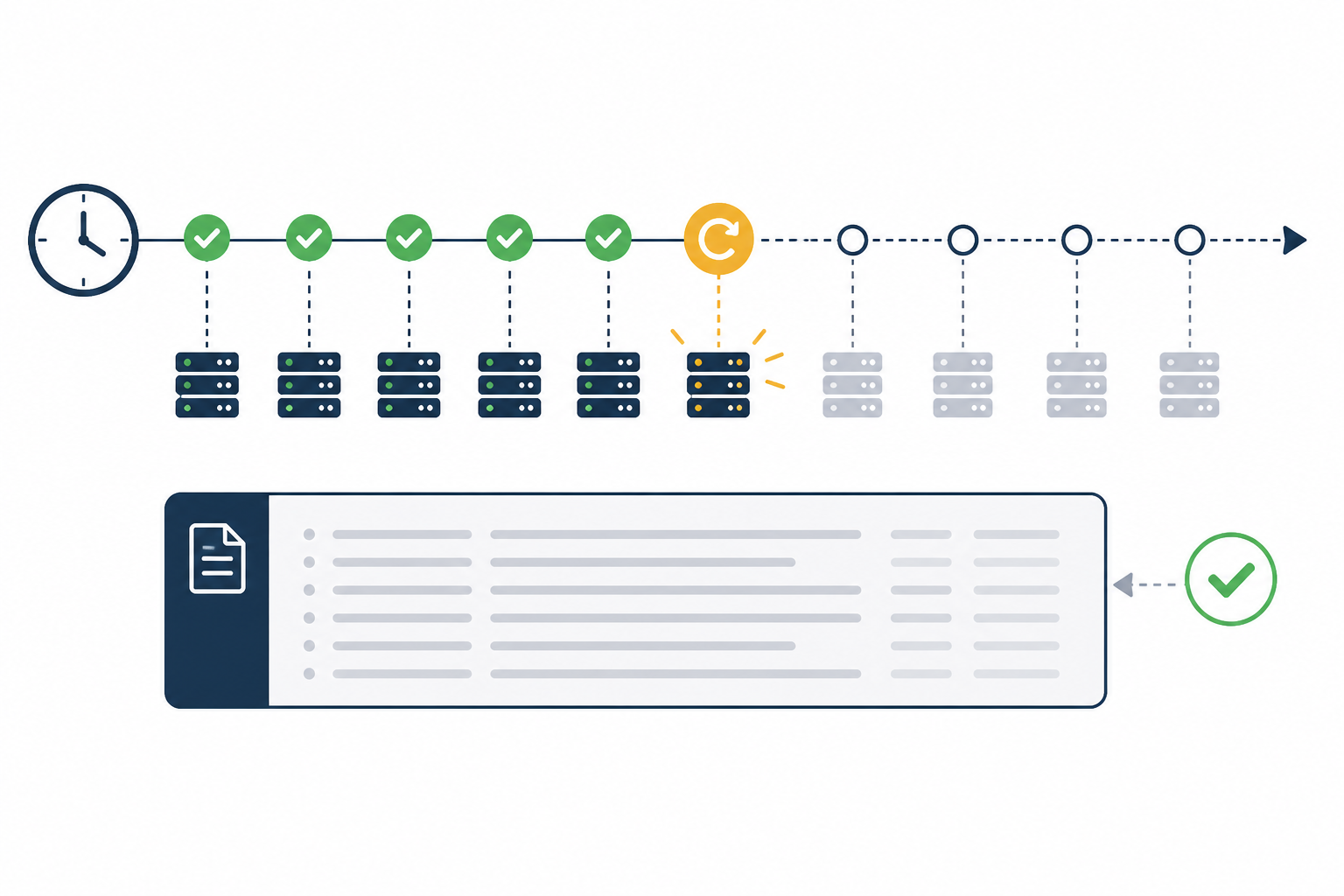
Cron job monitoring solves this by having each scheduled task "check in" with a monitoring service every time it runs successfully. If that check-in doesn't arrive within an expected window, you get alerted immediately — even if the job silently failed to start, crashed before logging anything, or the server itself went down. This is fundamentally different from traditional logging, which only tells you what happened, not whether something should have happened but didn't.
I want to walk you through why cron job monitoring matters, how heartbeat monitoring works under the hood, and how to set it up properly — for cron jobs, but also for the background workers and scheduled tasks that don't always fit the classic crontab mould. Grab a coffee — this one's worth reading slowly. ☕
Why Cron Jobs and Background Workers Fail Silently
Here's a scenario that trips up even careful teams: a server needs a routine patch, gets rebooted, and afterwards the scheduled job just... stops running. To be clear, a normal reboot doesn't usually wipe out a user's crontab — that's not how cron works. But the underlying causes are still common and just as silent: the crontab lived on an ephemeral container image that got rebuilt from scratch, a deployment script overwrote it, the cron daemon itself failed to restart, someone edited the wrong user's crontab, or an environment variable the job depended on quietly disappeared during the migration. The effect is the same either way — nobody notices, because nobody's watching for the absence of something. The job just quietly stops firing until someone eventually needs the output it was supposed to produce and asks, "wait, where's this data?"
That's just one flavour of silent failure. A few others trip up even experienced teams regularly:
- Deploys that break the schedule. A code change accidentally comments out a scheduled task, or a deployment script overwrites the crontab entirely. The job doesn't error out — it simply stops existing.
- Logging that never gets written. If your job crashes before it reaches the logging line (say, during initialisation), there's nothing in the logs to tell you anything went wrong. Your log file looks exactly as empty as it would on a quiet, uneventful day.
- Downstream dependency failures. A database connection times out, an API the job relies on returns an error, or a third-party service is briefly unavailable — and the process exits before it ever gets the chance to log the problem.
To make this concrete, picture a nightly backup script that's worked reliably for a year. A minor server migration changes the working directory the script expects, and it starts failing at the very first line — before any logging code even runs. The backups simply stop. Nobody notices for weeks, because the script isn't throwing errors anywhere anyone is looking. It's only when someone needs to restore a file that they discover there's nothing to restore. I've heard variations of this story often enough that I'd treat it less as a one-off horror story and more as a pattern worth designing around from day one.
That's the core problem with relying on logs alone: logs only capture what happened, and only if the code gets far enough to record it. They're brilliant for diagnosing a known issue. They're close to useless for catching a job that never ran at all.
It's also worth saying clearly: this isn't just a "cron" problem. Kubernetes CronJobs, serverless scheduled functions, CI pipeline jobs, and queue-consuming background workers all fail in the same silent ways — a worker can crash, hang, or simply never get scheduled by the platform, and from the outside it looks exactly like a healthy day with nothing to report.
What Is Heartbeat Monitoring, and How Does It Differ From Logging?
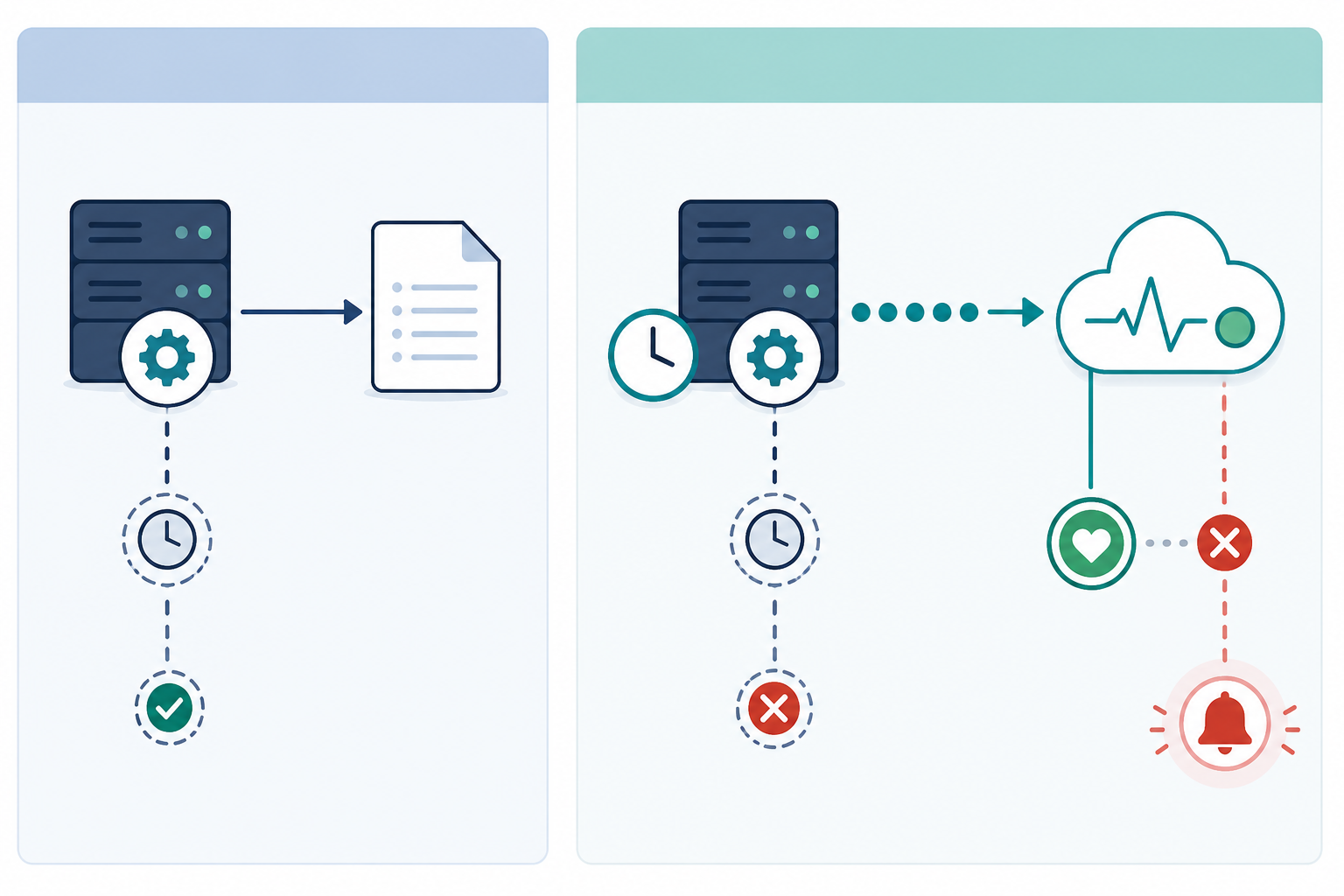
This is where heartbeat monitoring earns its keep. The distinction is simple: logging is passive, heartbeat monitoring is active. Logging waits for your code to tell it something happened — job runs, job maybe logs, you maybe check the log later. There's no expectation built into the system, so there's no way for it to flag an absence.
Heartbeat monitoring flips that. You set an expectation up front — "this job runs every hour" or "this backup runs nightly at 2am" — and the monitor holds that expectation for you. Every time your job finishes successfully, it sends a quick ping, usually a simple HTTP request, to a unique URL. The monitoring service watches the clock, and if that ping doesn't show up when it's supposed to, it fires an alert immediately, rather than waiting for someone to notice missing data weeks later.
This catches failure modes logs simply can't:
- A crashed process that never reaches a logging statement
- A cron entry or scheduled task that got silently deleted or disabled
- A server or platform outage that prevents the job from running at all
- Network issues that stop the job from starting, connecting, or completing
It's worth treating cron job monitoring as one piece of a bigger picture rather than a standalone tool. If you're already doing uptime monitoring on your website, API monitoring on your endpoints, and server monitoring on your infrastructure, heartbeat checks fill in a gap those tools genuinely can't cover, because none of them are watching for the absence of a scheduled event. Some monitoring platforms, Moonitor included, bundle heartbeat checks together with SSL certificate monitoring, DNS monitoring, and port or ping checks, so you're working from one dashboard instead of five — though the principle matters more than any specific tool, and it's worth checking what any provider actually guarantees before you rely on it.
How to Set Up Cron Job Heartbeat Monitoring
Setting up heartbeat monitoring is one of the faster wins you can get for your infrastructure — most teams have a first monitor running within minutes. Here's a step-by-step approach that works whether you're using Moonitor or a similar service.
Step 1: Create a heartbeat monitor
Create a new cron or heartbeat monitor in your dashboard and define how often the job is expected to run — every 15 minutes, daily at 2am, hourly, whatever matches the real schedule. If your team works across time zones (worth flagging for anyone scheduling jobs relative to UK office hours and the BST/GMT switch), make sure the expected time is set in the time zone your job actually runs in, not the one you happen to be sitting in.
Step 2: Copy the unique ping URL
Each heartbeat monitor generates a unique URL for that job. Treat this URL as a secret, not a public detail — anyone who has it can send fake "success" pings and mask a real failure. Avoid committing it to a public repo, printing it in build logs, or pasting it into shared docs. Store it in the same secrets manager or environment variable store you'd use for an API key.
Step 3: Add success-only reporting to your script
This is the part worth getting right, because a sloppy implementation can quietly defeat the whole point. You want the ping to fire only when the job has actually completed successfully — not just when the script happens to reach the last line. A simple, safer pattern looks like this:
#!/usr/bin/env bash
set -euo pipefail

## Run the actual job and capture its exit status
if ./run-backup.sh; then
  curl -fsS --max-time 10 --retry 3 "$PING_URL" > /dev/null
else
  status=$?
  echo "Backup failed with exit code $status" >&2
  exit "$status"
fi
A few details that matter in production: use --max-time so a hung network call doesn't leave your job waiting forever; use --retry so a single dropped packet doesn't cause a false "missed" alert; and store $PING_URL as an environment variable rather than hardcoding it in the script. It's also worth thinking about what happens if the job succeeds but the ping itself fails to send — a brief retry loop, as above, covers most of that risk, but nothing covers 100% of it, which is one more reason logs and heartbeats work best together rather than as substitutes for each other.
Step 4: Test the cron job manually
Run the job by hand and check your dashboard. You should see the check-in register almost instantly. This confirms the wiring is correct before you trust it to run unattended for the next six months.
Step 5: Configure your alert channels
Decide who needs to know when something breaks, and how. Most monitoring platforms support Slack, Discord, Telegram, email, and webhooks, so route alerts to wherever your team actually pays attention — not an inbox that gets checked once a day. Test the alert channel itself, not just the monitor; an alert that silently fails to deliver is its own kind of silent failure.
Step 6: Consider separate start and end signals for long-running jobs
A single success ping tells you the job finished — it doesn't tell you whether it finished on time. For jobs where runtime matters (a data sync that should never take longer than 20 minutes, for example), some monitoring tools let you send a start signal and an end signal, or configure an explicit maximum-duration check on top of the schedule. This isn't automatic just because you send two ordinary pings — check that your monitoring service actually supports duration tracking, otherwise you're just sending two heartbeats without gaining the runtime visibility you're after.
![Illustration: A step-by-step visual walkthrough showing a code snippet with a curl command added to the end of a script, an arrow pointing to a monitor dashboard interface with a unique ping URL for The Complete Guide to Monitoring Cron Jobs and Workers(https://www.moonitor.dev/docs/heartbeats) field, and a final panel showing a green 'check-in received' confirmation]
Choosing Cron Job Alert Thresholds That Actually Work
Getting the alert to fire is one thing. Getting it to fire at the right time is a different challenge, and it's where a lot of teams stumble — either drowning in false alarms or missing real problems because the tolerance was set too loose. It helps to think about three separate settings rather than one vague "threshold":
- Expected interval — how often the job is supposed to run (hourly, nightly at 2am, every 15 minutes).
- Grace period — how much lateness is tolerable before you're alerted that a check-in is missing. This absorbs normal variance without becoming an emergency.
- Maximum runtime — separate from the schedule, this covers jobs that start on time but hang or run far longer than expected, which needs start/end tracking rather than a single completion ping.
A few principles worth keeping in mind as you set these:
- Match the grace period to real-world variability. If your job occasionally takes 90 seconds longer than usual for perfectly normal reasons, don't set your grace period at 91 seconds. You'll get paged for nothing, and that's a fast way to start ignoring alerts altogether.
- Separate "late" from "missing." A short grace window can trigger a soft warning, while a longer window escalates to a full incident. An hourly job might warrant a 10-minute grace period; a nightly backup might reasonably tolerate 30 to 60 minutes before anyone needs to worry.
- Weight thresholds by criticality. A customer-facing data sync feeding a live dashboard deserves tight tolerances. A weekly internal report generator can afford a much longer grace period.
- Don't loosen thresholds just to reduce noise. It's tempting to widen the window until alerts stop, but if you widen it too far, real failures can sit unnoticed for hours. The goal is precision, not silence.
- Borrow the mindset from multi-region uptime checks. Just as verifying a website outage from multiple locations avoids false alarms from a single flaky network path, the goal with cron thresholds is confidence — catching what's genuinely wrong without crying wolf over normal variance.
Common Cron Monitoring Mistakes to Avoid
I've seen the same handful of mistakes crop up again and again, even among teams that are otherwise disciplined about their infrastructure. Worth checking yourself against this list:
- Monitoring the server instead of the job. Knowing the server is up tells you nothing about whether the actual task completed. Monitor the job directly.
- Pinging at the start instead of the end. If your script pings the moment it starts, you'll confirm it started — not that it finished, or finished successfully. Ping on completion, and only on success.
- Forgetting to update the schedule. Change your cron frequency from hourly to every 30 minutes and forget to update the monitor, and you'll get flooded with false "missed check-in" alerts that train your team to ignore real ones.
- Leaving ping URLs exposed. A URL committed to a public repo or pasted into a shared Slack channel can be hit by anyone, masking a real failure behind a fake success signal. Treat it like a credential.
- Attaching a monitor to the wrong environment. It's surprisingly common to wire up a heartbeat in staging, confirm it works, and never repeat the exercise in production — where it actually matters.
- Never testing the alert path. A monitor that correctly detects a missed job is only useful if the resulting alert actually reaches someone. Test the whole chain, not just the detection half.
- Trusting "no news is good news" logging. A silent, successful job looks identical to a silent, broken one if you're only checking logs.
- Setting it up once and forgetting about it. Job behaviour changes over time — runtimes creep up, dependencies shift. Thresholds set a year ago might not fit reality anymore.
Best Practices for Reliable Cron Jobs and Heartbeat Monitoring
Once you've got the basics running, a few habits keep your cron job monitoring genuinely useful rather than a box you ticked once:
- Pair heartbeat monitoring with good logging, not instead of it. The heartbeat tells you that something broke; your logs tell you why. Alert first, diagnose second.
- Document every scheduled job in one place. Expected frequency, owner, purpose, and a link to a short runbook — a simple shared doc saves enormous confusion later, especially when someone new joins the team.
- Assign an owner and a severity to every monitor. "Someone will notice eventually" isn't a plan. Know who gets paged, and how urgently, for each job.
- Use incident history to spot slow-building trends. A job that's been quietly taking 5% longer each week is easy to miss in the moment, but obvious once you can see the pattern laid out.
- Periodically test failure paths on purpose. Deliberately break a non-critical job in staging every so often to confirm the alert still fires and still reaches the right person.
- Set up a status page for customer-facing jobs. If a scheduled task feeds into something your customers see, a status page gives stakeholders visibility without them needing to ping your team every time something looks off.
- Audit your monitors regularly. Are you tracking every job that actually matters, or just the ones that embarrassed you once before? A periodic sweep catches stale or orphaned monitors before they become false confidence.
Getting this right doesn't take a huge investment of time. It takes a shift in mindset — from reacting to failures you happen to notice, to proactively watching for the absence of success. Once that shift happens, scheduled jobs and background workers stop being a source of quiet anxiety and start being something you genuinely don't have to think about day to day.
Frequently Asked Questions About Cron Job Monitoring
How do I know if my cron job actually ran?
The most reliable way is heartbeat monitoring: your job sends a ping to a monitoring service every time it completes successfully, and you're alerted right away if that ping doesn't arrive on schedule. Checking logs after the fact only works if the job got far enough to write to them.
What is heartbeat monitoring, and how does it differ from logging?
Logging is a passive record of what your code did, written only if the process runs long enough to produce it. Heartbeat monitoring is an active expectation set in advance — you tell the monitor how often a job should run, and it alerts you the moment that expectation isn't met, whether the cause is a crash, a server outage, or a cron entry wiped during a deploy.
How often should I check in on scheduled jobs?
Ping on every successful completion, no matter how frequent the schedule. For jobs running every few minutes, set a tight grace period; for daily or weekly jobs, allow a bit more buffer to account for normal runtime variance without triggering false alarms.
Is it safe to expose the heartbeat ping URL in my code or logs?
No — treat it as a secret. Anyone with the URL can send a fake success signal and hide a genuine failure. Store it as an environment variable or in a secrets manager, the same way you'd handle an API key.
Can I monitor jobs that run on irregular schedules or background workers?
Yes, though it depends on the tool. Some heartbeat services let you define flexible windows rather than strict fixed times, which suits event-triggered jobs or variable-length batch processes. For continuously running workers, you may need liveness or progress checks rather than a single fixed-interval heartbeat — worth confirming a given tool actually supports this before relying on it.
Does heartbeat monitoring replace the need for application logs?
No, and it shouldn't try to. Heartbeat monitoring tells you that something went wrong; logs tell you why. Get the alert first, then dig into the logs to diagnose the root cause.
If you're running scheduled jobs that matter — backups, syncs, reports, anything your business quietly depends on — it's worth setting up proper heartbeat checks before you find out the hard way that something's been silently broken for weeks. Here's a quick checklist to start with: pick one job that would genuinely hurt if it failed silently, create a monitor for it, add success-only reporting to the script, test it by hand, and wire up an alert channel your team actually watches. Most monitoring platforms, including Moonitor, offer a free trial to get started — worth checking the current terms directly, since trial details change over time. Sometimes the best infrastructure investment is the one you barely notice, because it's quietly doing its job in the background — which, fittingly, is exactly what we're trying to monitor for in the first place. 🌙