
What Is Uptime Percentage? 99.9% vs 99.99% Explained
Learn what uptime percentage means, how much downtime 99.9% allows, how to calculate your own uptime, and which target suits your small business.

Uptime percentage is the share of time your website, API or service is working over a given period. 99.9% uptime allows roughly 43 minutes of downtime a month (about 8.8 hours a year), while 99.99% allows only about 4 minutes a month. For most small businesses, 99.9% is a realistic target, as long as you measure it from outside your own infrastructure.
That's the short version. Below, I'll turn the numbers into real minutes, show you how to calculate your own uptime percentage, and help you pick a target you can keep without losing sleep. ☕
What does uptime percentage measure?
Picture a small online shop. On a Friday evening, a plugin update quietly breaks the checkout button. The homepage loads fine, the product pages look lovely, and nobody on the team notices. Customers click 'Pay', nothing happens, and they wander off. By Monday morning, a whole weekend of sales has evaporated.
That's when a single percentage starts to matter. It gives you one honest number for 'how often did this actually work?'
The formula is simple: (total time − downtime) ÷ total time, expressed as a percentage. If your service was working for 99.9% of the month, your uptime percentage is 99.9%.
What counts as 'up'?
Here's the catch. A server that responds isn't the same as a page that works. In the shop example above, the server was perfectly happy. It just couldn't take payments.
So a good definition of 'up' goes beyond 'something answered'. It usually includes:
- A healthy status code, such as a 200 rather than a 500 error
- The right content, checked with a keyword (for example, the word 'Checkout' or 'Add to basket' actually appearing)
- A response time under a threshold you choose, for example 10 seconds. A page that takes 40 seconds to load may technically respond, but for most visitors it's unusable, so many teams count anything beyond their threshold as down
Agree on that definition early, and write it down. Every number you calculate later will mean more.
Why does the uptime measurement period matter?
An uptime figure is always tied to a window: a month, a quarter, a year. The window changes how forgiving the number feels. A single 3-hour outage ruins a month at 99.9%, but measured across a year it fits inside the budget (you'd still have about 5.7 hours of that annual allowance left). When someone quotes you a figure, always ask 'over what period?'
99.9% vs 99.99% uptime: the nines in minutes and hours
People talk about 'the nines' because each extra nine is a big leap in reliability. But 99.9 and 99.99 look almost identical on paper, so let's turn them into time you can picture.
| Uptime | Per day | Per week | Per month (30 days) | Per year | Roughly equivalent to |
|---|---|---|---|---|---|
| 99% | 14.4 min | 1.68 hours | 7.2 hours | 3.65 days | A long weekend of trouble |
| 99.9% | 1.44 min | 10.08 min | 43.2 min | 8.76 hours | One bad deployment and a slow fix |
| 99.95% | 43.2 sec | 5.04 min | 21.6 min | 4.38 hours | A single short incident a month |
| 99.99% | 8.64 sec | 1.01 min | 4.32 min | 52.56 min | One brief restart a month |
| 99.999% | 0.86 sec | 6.05 sec | about 26 sec | 5.26 min | A few seconds a week |
These figures assume a 30-day month and a 365-day year, so you can check the maths yourself. Real SLAs sometimes use slightly different periods, so read the small print.
Caption: A quick-reference version of the table above, handy for sharing with colleagues who just want the headline numbers.
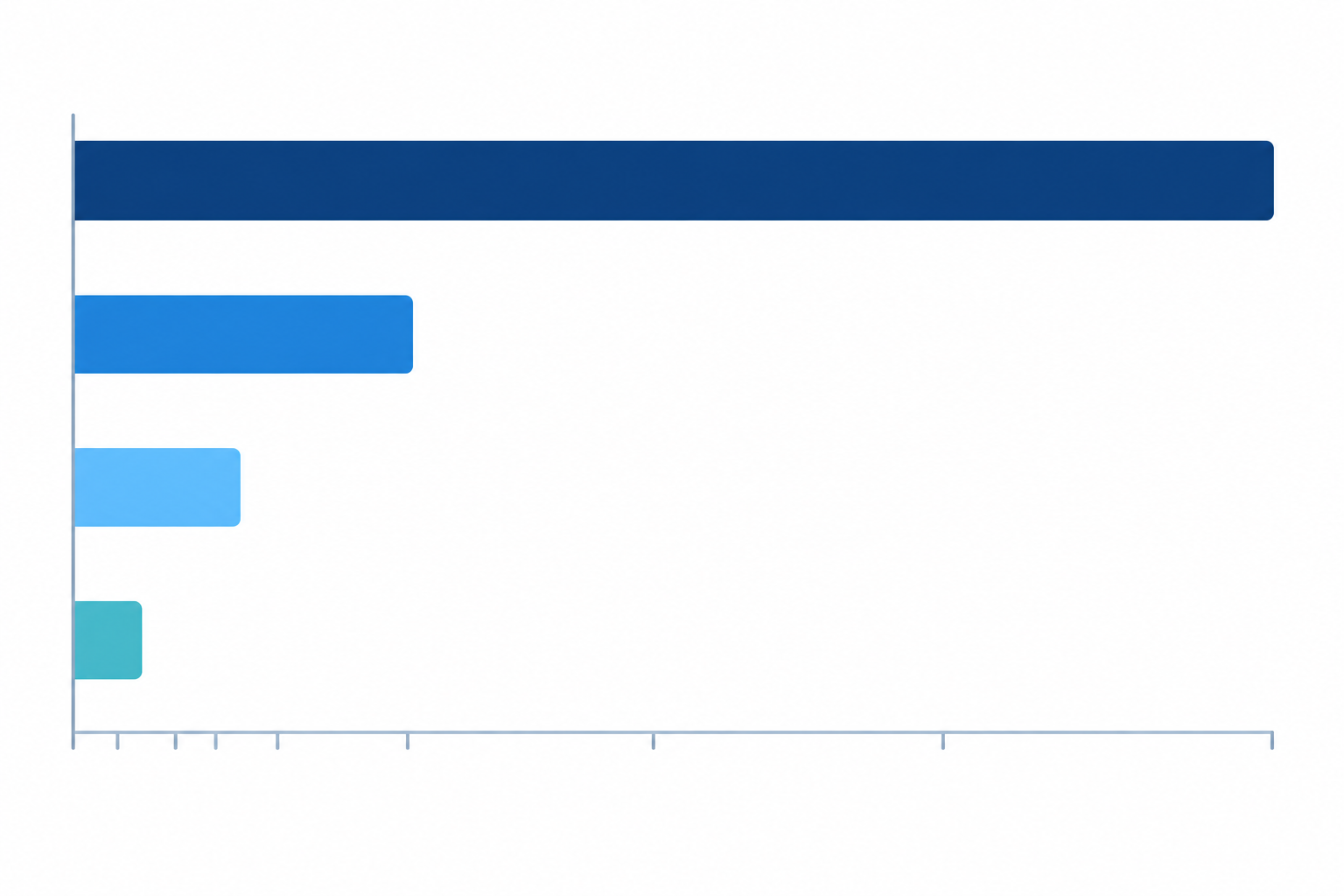
Caption: Allowed downtime in a 30-day month at each uptime level. Notice how quickly the bars shrink.
See the pattern? Each extra nine cuts the allowed downtime by roughly ten times. That's great for your customers, but the effort and money required climb steeply too. Going from 99% to 99.9% might mean better hosting and tidier deployments. Going from 99.9% to 99.99% can mean rethinking your whole architecture.
And a gentle warning: at 99.99%, a single five-minute outage uses up your entire month's budget. One bad restart, and you've missed your target before the month is half over.
What is the difference between 99.9% and 99.99% uptime?
On paper, the gap is 43 minutes versus 4 minutes. In practice, it's often the gap between 'we can handle one incident calmly' and 'our systems need to recover on their own, whatever the hour'.
Mathematically, 99.9% allows 0.1% unavailability and 99.99% allows 0.01%, so the allowance is exactly ten times smaller. That's a comparison of targets, not a guarantee. An extra nine doesn't mean zero outages. It means a much smaller budget for them.
What does 99.99% uptime often involve?
How you reach four nines depends on your service, how it's built, and how availability is defined and measured. Still, teams aiming for it commonly rely on approaches like these:
- Redundant components, so one failure doesn't take everything down (sometimes across several zones or regions)
- Automated recovery, so nobody has to wake up and click a button
- Zero-downtime deployments, because even a planned restart eats your budget
- Fast incident response, which for some services means round-the-clock on-call cover
Not every four-nines service needs all of these, and a simple, well-designed system may need fewer. The point is that with only about 4 minutes a month to spare, recovery generally can't wait for a human to notice.
Even big providers attach conditions to their top-tier promises. Amazon's EC2 SLA, for instance, sets a 99.99% monthly commitment only for qualifying instances deployed across two or more Availability Zones. It isn't a blanket promise for every setup.
Why is 99.9% uptime a realistic target for many small businesses?
Three nines is achievable with a sensible hosting setup, good deployment habits and fast incident alerting. It's also a familiar benchmark in business software. Google Workspace's SLA, for example, specifies 99.9% monthly uptime for covered services (subject to its terms and exclusions). If household-name platforms are comfortable at that level, a startup can be too.
Be honest about diminishing returns. For a brochure site or an early-stage SaaS, the fourth nine rarely earns back what it costs. The right target depends on what an outage actually costs you. A brief blip on a low-traffic informational page is a very different thing from an interruption to online orders, payments or bookings.
How does detection speed affect uptime?
Here's something people forget. If you find out about an outage after 30 minutes instead of 1, you may have burned most of a 99.9% month before you've even started fixing anything. Fast detection protects your percentage as much as fast repair does.
One more thing worth knowing: an SLA figure from a provider isn't necessarily the availability your customers experience. Your application, network, payment processor and other dependencies all play a part. So check what an SLA actually covers, and monitor from the customer's point of view.
How do you calculate uptime percentage?
You don't need a maths degree. Here's the process, step by step.
- Choose your measurement window. A calendar month is the most common choice. Work out the total minutes in it (a 30-day month is 43,200 minutes).
- Add up your downtime minutes from your incident history. Use the same definition of 'down' every time, such as 'the checkout returned errors or didn't load within 10 seconds'.
- Do the sum. Subtract downtime from total minutes, divide by total minutes, and multiply by 100.
- Decide how to handle partial outages. If checkout is down but the homepage is up, does that count? Pick a rule (for example, 'any critical user journey failing counts as down') and apply it consistently.
- Track each service separately. Your website, API, server, cron jobs and SSL certificates can each have their own figure, and the weakest one often tells the real story.
Uptime percentage calculation: a worked example
Imagine a three-person team running a small online shop. A bad deployment breaks checkout at 14:00 on a Tuesday. Their monitor flags it within a couple of minutes, but the fix takes a while, and by the time checkout works again the month's incident log shows 65 minutes of downtime in total.
(43,200 − 65) ÷ 43,200 × 100 = about 99.85%
That misses a 99.9% target, even though it feels like a pretty good month. Sixty-five minutes sounds small until you remember the budget was only 43. The useful takeaway for that team isn't blame. Faster detection and an easy rollback would have kept them on target.
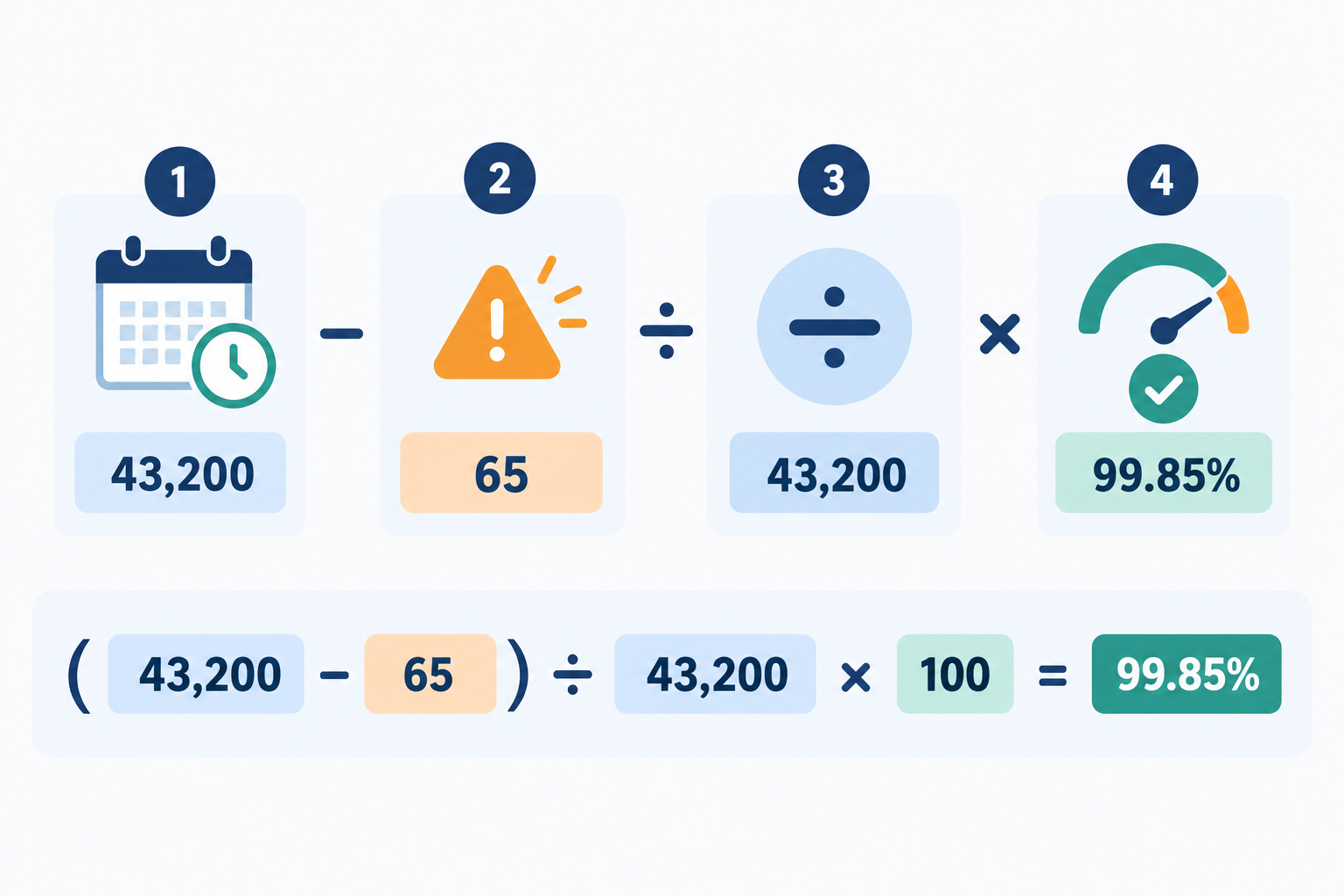
Caption: The uptime formula in four steps, using the 65-minute example.
💡 Tip: let your monitoring tool's incident history do the arithmetic. Trying to reconstruct outages from memory (or from a half-remembered Slack thread) after the fact is how numbers end up flattering and wrong.
Does scheduled maintenance count as downtime?
This one depends on who's asking. Your customers experience a down service whether it was planned or not. Contracts, on the other hand, often exclude announced maintenance windows. There's no universal rule, so the policy that applies decides which figure is 'correct'.
Here's a simple illustration. If your service is unavailable for 30 minutes during a planned window, you might report 100% SLA uptime if your SLA explicitly excludes that window. If you count all customer-impacting unavailability, those 30 minutes reduce your uptime. Both are valid. They just answer different questions.
You have two main options:
- Count everything. This is the strictest and most honest approach, and the easiest to explain internally.
- Exclude announced maintenance from your SLA figure, but still record it. This is common in contracts, but it's only fair if windows are short, announced well in advance and scheduled at quiet times.
My recommendation? Track both numbers: 'total availability' and 'availability excluding planned maintenance'. It keeps you honest with yourself while still matching what a contract might require.
A few related habits help:
- Announce maintenance ahead of time on a public status page, so it builds trust instead of eroding it.
- Say how much notice you'll give, and how emergency maintenance is handled.
- Check how your hosting provider defines maintenance in its own SLA, since that affects what you can safely promise your customers.
Which uptime target suits your business?
Here's a rough guide. Treat it as a starting point rather than gospel.
- 99% (about 7 hours a month): fine for internal tools, hobby projects or low-stakes sites, but a long outage would be noticeable.
- 99.9% (about 43 minutes a month): a sensible default for most startups, small e-commerce shops, agencies and early-stage SaaS products.
- 99.95% (about 22 minutes a month): worth considering if paying customers depend on your product during working hours.
- 99.99% and above: usually reserved for payments, healthcare, infrastructure providers, or contracts that carry financial penalties.
How much downtime can your business afford?
Estimate what one hour of downtime costs you: lost sales, extra support tickets, a dent in trust. Then compare that with the cost of engineering the next nine. If an hour costs you £200 and the extra redundancy costs £2,000 a month, you'd need to be losing ten hours a month for the upgrade to pay for itself. That's a very different conversation from 'we want four nines'.
What uptime should you promise customers?
Set your public target slightly below what you actually achieve, so you can beat it rather than apologise for missing it. If you've been running at 99.95% for several months, promising 99.9% leaves room for the occasional bad month.
If you sell to other businesses in the UK, expect availability to come up in customer contracts, security questionnaires and procurement exercises. Requirements vary a lot by contract and sector. A public-sector or financial-services buyer may ask for specific figures, reporting and incident notification terms, while a small agency client may simply want reassurance. Either way, it's much easier to answer confidently when you already have months of real data and a clear definition of what 'down' means.
Why should you measure uptime externally?
If you only rely on your own server's opinion of itself, you've got a blind spot. Your server can say it's perfectly healthy while DNS, a certificate or a network route is failing for real visitors.
External uptime monitoring runs checks from outside your infrastructure, requesting your pages and endpoints the way a visitor's browser would. It tests the URLs and journeys you've configured, from the locations you've chosen, so it can catch problems an infrastructure-only SLA figure may not count.
How do check frequency and failure rules affect uptime?
Here's a detail that's easy to overlook. External monitors check at intervals, say every minute or every five minutes, so your reported uptime is an estimate built from samples, not a continuous recording.
- Short outages can slip through. An outage that starts and ends between two checks may never be recorded.
- Detection lags by up to one interval. With five-minute checks, you could be down for several minutes before anyone knows, which eats into a 99.9% budget.
- Failure rules change the figure. Many tools only call something an outage after a failed check is confirmed, for example by retrying or by checking from another location. That cuts false alarms, but it trades a little detection speed for fewer 2am buzzes.
It's worth reading how your monitor calculates availability: how often it checks, how it confirms failures, and when it starts and stops the clock on an incident. Then match those settings to how much downtime your business can tolerate.
How does multi-region monitoring filter out false alarms?
A single failed check from one location might be a network blip, not your service. If you count every blip as an outage, your uptime figure suffers and your phone buzzes for nothing.
That's why Moonitor uses multi-region failure verification, confirming a failure from more than one location before alerting. There's a trade-off, though. If a problem only affects one region or one group of users, a multi-location rule may not flag it as an outage. So if most of your customers are in the UK, make sure UK-based checks are part of your setup.
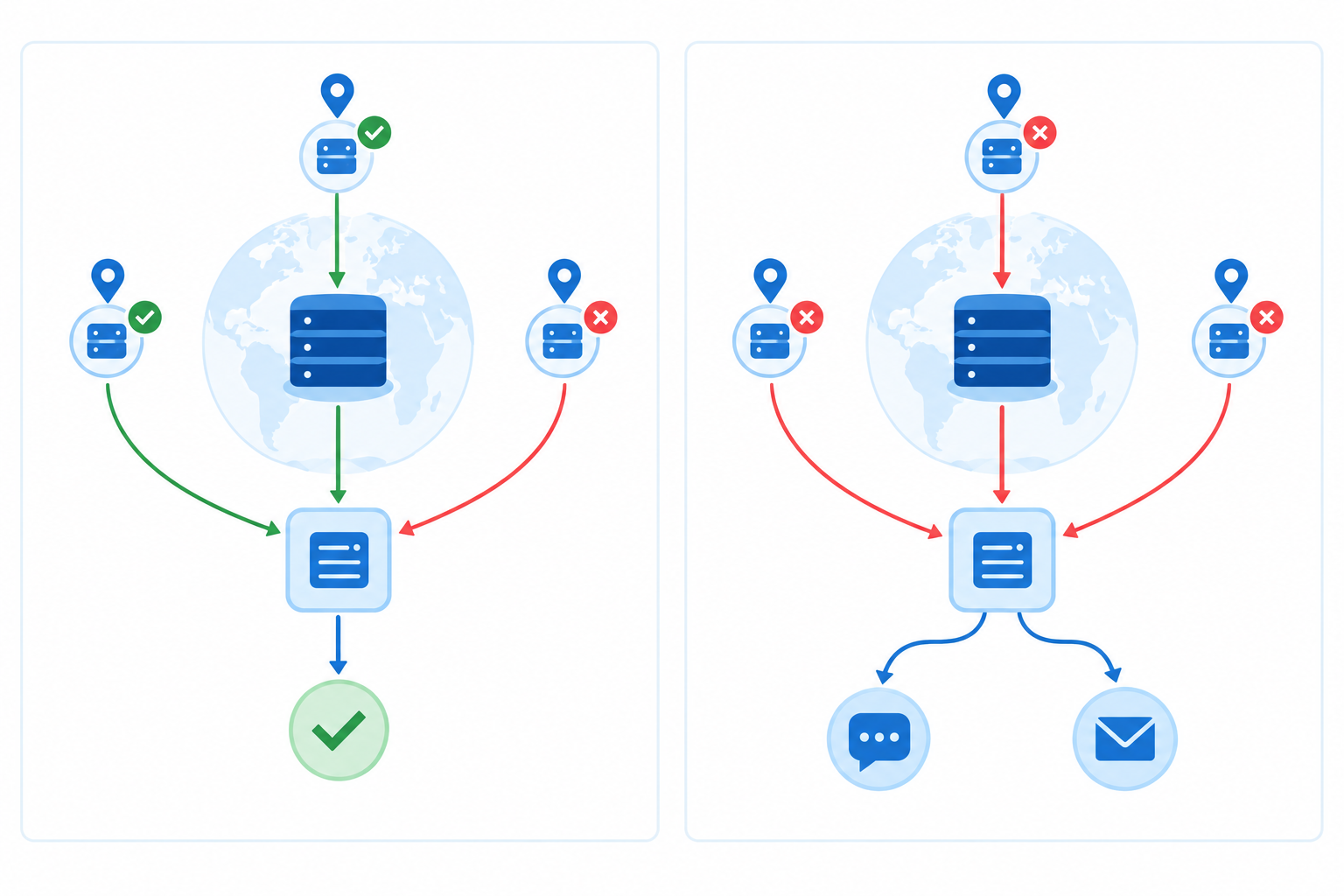
Caption: How multi-location confirmation separates a one-off blip from a genuine outage.
What kinds of downtime can a basic website check miss?
A plain website check won't catch everything. Common culprits include:
- An expired SSL certificate, which makes browsers show scary warnings
- A changed DNS record that quietly points visitors somewhere else
- A silent cron job that stopped running days ago (backups, invoices, emails)
- A closed port on a server or database
- An API returning errors with a 200 status, so the check passes while the response is broken
Which uptime monitoring checks should you use?
This is where a few different monitor types earn their keep, ideally under one dashboard:
- Website monitoring (HTTP/S and keyword checks) for pages and key journeys
- API monitoring to confirm endpoints respond correctly
- Server monitoring through port and ping checks
- SSL certificate monitoring and domain expiry alerts
- DNS monitoring to catch record changes
- Cron job monitoring (also called heartbeat monitoring), where your job pings a URL and you're alerted if it goes quiet
Finally, incident alerting via email, Slack, Discord, Telegram or webhooks shortens your time to detection. And as we saw earlier, that directly protects your percentage.
How to get started with uptime monitoring
You don't need to monitor everything on day one. Start small and build up.
- Pick your most important endpoint. That might be your homepage, login, checkout or core API. Add an HTTP/S or keyword monitor for it.
- Add the silent failures. Set up SSL and domain expiry checks, DNS record change detection, and a heartbeat monitor for any scheduled job.
- Connect an alert channel your team actually reads, such as Slack, Discord, Telegram or email. An alert nobody sees is just a log entry.
- Publish a branded status page. Customers hear about incidents from you first, and your incident history becomes evidence of your uptime.
- Review after a quarter. Look at response-time analytics and your monthly uptime figure, then revisit your target with real data rather than guesswork.
If you'd like a hand: Moonitor covers the monitor types above in one dashboard and offers a free trial, plus an API and data export. Plans and pricing change, so check the current details on the Moonitor site before you decide.
Uptime percentage FAQs
How much downtime is 99.9% uptime?
About 43 minutes in a 30-day month, or roughly 8 hours 46 minutes a year. It's often called 'three nines'.
Is 99.99% uptime worth it for a small business?
Usually not at first. Four nines leaves about 4 minutes a month, which typically means redundancy and automated recovery. Most startups get better value from a solid 99.9% and fast detection.
What uptime should I promise my customers?
A figure you can comfortably beat, based on several months of externally measured data. If you've been running at 99.95%, promising 99.9% leaves some breathing room.
How do I calculate uptime percentage?
(Total minutes − downtime minutes) ÷ total minutes × 100. Use one consistent definition of 'down' throughout.
Does scheduled maintenance count towards downtime?
That depends on your definition and any contract. Many SLAs exclude announced windows, but customers still feel the outage, so record both figures.
What's the difference between measured uptime and an SLA commitment?
Measured uptime is what actually happened, according to your monitoring. An SLA is a contractual promise with its own definitions, exclusions and remedies. The two can differ, so check which one you're being quoted.
Why does my uptime look different from my hosting provider's figure?
Providers usually measure their own infrastructure. An external monitor tests the pages and endpoints you've configured from the locations you've chosen, so it can reveal DNS errors, expired certificates or broken application responses that a host's figure may not include.